On-Page SEO: The Complete Guide to Optimization
Learn on-page SEO step by step. Optimize title tags, headings, content, images, internal links, and page experience with this complete SEO guide.

On-Page SEO: The Complete Guide to Optimizing a Web Page#
SEO isn't simply about publishing content and hoping that Google picks it up. Every page on your site must clearly state what it is, answer the searcher's question, and deliver a useful experience.
That's where on-page SEO comes in.
Whether you've got a personal blog, an online shop, a business website, or a content site, optimizing individual pages can go a long way toward helping <a href="https://flexaseo.com/blog/how-search-engines-work" title="How Search Engines Work Guide">search engines</a> understand your content and helping visitors find what they're looking for.
In this complete guide, you'll learn what on-page SEO is, why it's important, how to optimize each key page element, and how to use a practical checklist to improve your site.
What Is On-Page SEO?#
On-page SEO (also known as on-site SEO) is the process of optimizing individual pages to help search engines understand what the page is about and help users find the information they're looking for.
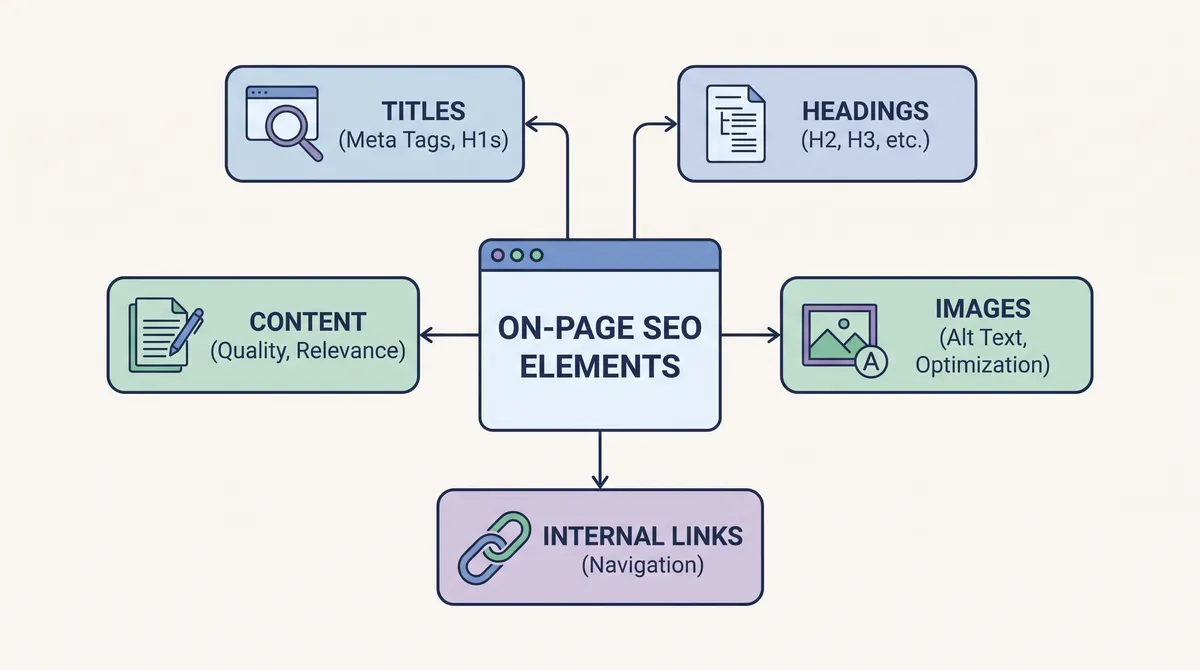
It involves improving elements that you can control directly on a page, including:
- Page titles and meta descriptions
- Headings and content structure
- Keyword placement and topical relevance
- Images and alternative text
- Internal links
- URL structure
- Content quality and readability
- Page experience and usability
The main aim of on-page SEO is to make the page relevant, understandable, and useful to the user.
For instance, if you're writing an article on website speed optimization, the page should explain what website speed is, why it's important, and how you can improve it. The title, the headings, the examples, and the supporting resources should all serve that purpose.
On-page SEO isn't about putting your keyword in every paragraph. It's about making it clear to both users and search engines what the page is about and what value it provides.
Google for Developers+1
Why is on-page SEO important?#
On-page SEO helps search engines understand your content and makes it easier for users to use your site.
Here are some of its key benefits.
1. Helps Search Engines Understand Your Content
Clear titles, descriptive headings, relevant content, and appropriate links all provide useful context for a page.
This helps the search engines understand what the page is about and how it relates to relevant searches.
2. Improves Search Result Relevance
A page that answers the searcher's query is more likely to be useful than a page that only contains the keyword.
For example, someone searching for 'how to write an SEO title' is looking for practical advice, not a general introduction to digital marketing.
3. Improves the User Experience
Well-structured content is easier to read, navigate, and understand.
Short paragraphs, descriptive headings, useful examples, and a logical structure help readers find the answers they're looking for without unnecessary effort.
4. Supports Organic Traffic Growth
When a page becomes more relevant and useful to the target audience, it may become eligible to appear for a wider range of relevant searches.
However, on-page optimization doesn't guarantee a higher rank. Search visibility depends on many factors, including relevance, competition, crawling, indexing, and Google's ranking systems.
Google for Developers+1
On-Page SEO vs. Off-Page SEO vs. Technical SEO#
SEO is generally split into three main areas.
| On-Page SEO | Optimizing individual pages | Titles, content, headings, images |
| Off-Page SEO | Signals and reputation beyond your website | Relevant backlinks, brand mentions |
| Technical SEO | Making the website accessible and understandable to search engines | Crawling, indexing, canonical tags, site architecture |
These areas work together.
For instance, an informative article can have fantastic on-page optimization and still fail if the page is blocked from being indexed.
Similarly, a technically sound site may not get meaningful organic traffic if the content doesn't meet <a href="https://flexaseo.com/blog/search-intent-seo" title="Search Intent Explained">search intent</a>.
A good SEO strategy considers all three areas rather than treating on-page SEO as a standalone exercise.
How to Optimize a Web Page for SEO: 12 Essential Techniques#
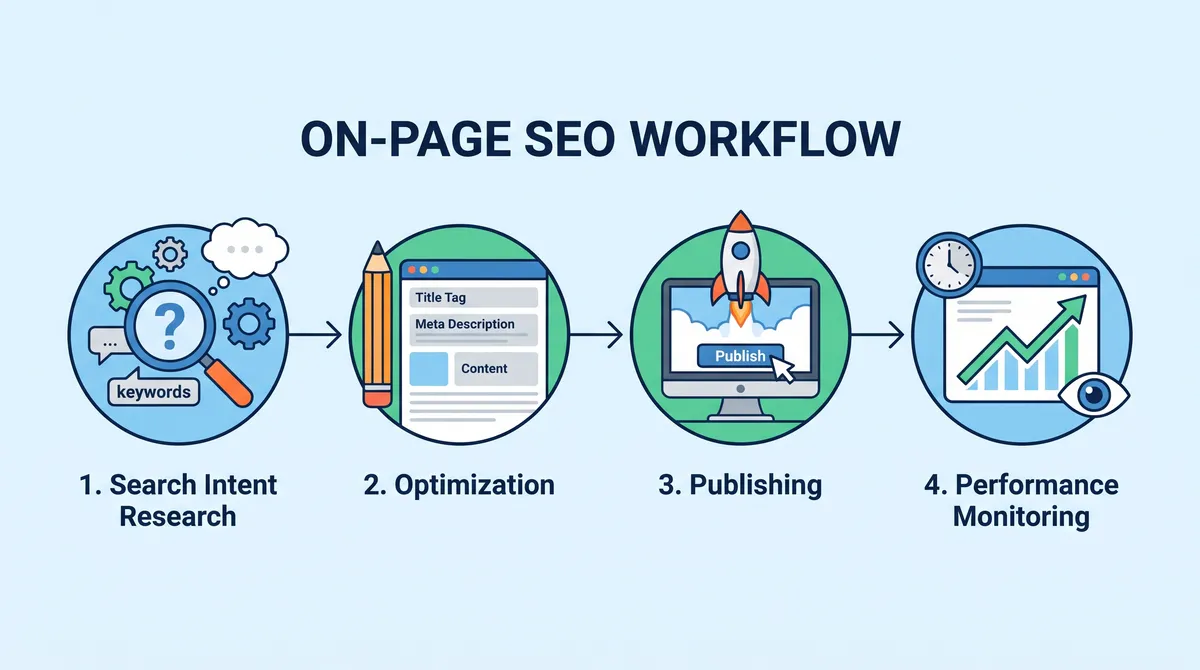
The following are techniques that form a practical on-page SEO workflow. Use them when creating a new page or when optimizing an existing one.
1. Understand Search Intent Before Writing
Search intent is the reason for the search query.
Before you start creating content, work out what the searcher actually wants to achieve.
There are four common types of search intent:
| Informational | Learn something | What is on-page SEO |
| Navigational | Find a specific website | Ahrefs login |
| Commercial | Research before making a purchase | Best SEO tools |
| Transactional | Complete an action or purchase | Buy SEO software |
Understanding search intent is key to picking the right content format.
For instance, someone searching for 'on-page SEO checklist' will want a practical list of things to do. A long theoretical piece with no checklist at all would be a very poor fit.
How to identify search intent:
- Search for your target keyword in Google.
- Review the first few relevant organic results.
- Identify the predominant content format.
- Look for the common questions and subtopics.
- Determine what your page can offer that the existing results don't.
Don't copy the competing articles. Use them to understand what searchers want, then produce something more useful.
2. Choose the Right Primary Keyword
A primary keyword is the main topic of your page.
For this article, the primary keyword is:
on-page SEO
Related <a href="https://flexaseo.com/blog/what-are-keywords-in-seo" title="What Are Keywords in SEO Guide">keywords</a> include:
- On-page SEO optimization
- On-page SEO checklist
- On-page SEO techniques
- How to optimize a web page
- SEO content optimization
- On-page SEO factors
These related terms will help you understand the various facets of the subject that a reader may wish to learn about.
There's no need at all to force every keyword into the article.
Google's language understanding systems can identify relevant concepts and variations without requiring the exact phrase to appear on the page.
Google for Developers
Practical keyword placement:
| SEO title | Include the primary keyword naturally |
| H1 | Clearly describe the main topic |
| Introduction | Mention the topic early |
| H2 or H3 | Include a relevant variation where appropriate |
| Body content | Use natural language and related concepts |
| URL | Use a concise, descriptive slug |
| Image alt text | Describe the image accurately |
Don't do keyword stuffing. Unnecessarily repeating the same phrase is just going to make the content painful to read and won't in any way give you a legitimate ranking benefit.
3. Optimize the Title Tag
The title tag is an HTML element that defines the title of the page.
It affects the title link that appears in search results and helps users understand what the page is about.
A strong SEO title should be:
- Unique to the page
- Descriptive and relevant
- Concise
- Easy to understand
- Consistent with the visible page heading
Google may create a title link from several sources (the HTML title, the H1 heading, other page content, etc.). You can influence what the title says, but you can't guarantee that Google will use it as you've written it.
Google for Developers+1
Example:
FlexaSEO · SEO Guide
On-Page SEO: The Complete Guide to Optimization
Learn how to optimize your titles, headings, content, images, internal links, and page experience with this practical SEO guide.
A commonly suggested figure is around 50-60 characters, though again, this is just a guide rather than a strict Google limit. Search results can be truncated to fit within the available space.
Avoid:
- Repeating the same keyword several times
- Using vague titles such as "SEO Tips"
- Adding unnecessary years to evergreen content
- Promising results the article cannot deliver.
4. Write a Compelling Meta Description
A meta description is an HTML attribute that describes the page.
Google may use it as the search result snippet, or it may generate a snippet from the page's visible content.
A useful meta description should explain:
- What the page covers
- Who the information is for
- What the reader will learn
- Why the page is worth visiting
Example:
'Learn on-page SEO step by step. Learn how to optimize your title tags, your headings, your content, your images, your internal links, and your page experience with this complete SEO guide.'
Aim for a short description (around 140-160 characters if possible). It's not a strict display limit.
Meta descriptions aren't a direct Google ranking factor, but a clear and relevant description will certainly help the user decide whether or not to click on your result.
Google for Developers
5. Create an SEO-Friendly URL
A URL should help the user understand what the page is about before opening it.
Compare these examples:
Good URL
https://example.com/on-page-seo-guide
Less descriptive URL
https://example.com/post?id=84721
A good URL structure generally follows these practices:
- Use descriptive words.
- Keep the URL reasonably short.
- Separate words with hyphens.
- Avoid unnecessary parameters.
- Use a logical website structure.
- Don't change established URLs unless you have a very good reason for doing so.
Descriptive URLs help users understand a page and can also affect how Google displays breadcrumbs in search results.
Google for Developers
If you're changing an existing URL, then implement an appropriate redirect to the new URL and update any internal links.
6. Structure Headings Correctly
Headings are used to group the content into sections that make sense.
They help readers scan an article and see how the ideas relate to one another.
A typical heading structure looks like this:
Heading best practices:
- Use one clear main heading for the article.
- Use H2 headings for major sections.
- Use H3 headings for related subsections.
- Make headings descriptive.
- Don't use headings just for visual effect.
- Do not force keywords into every heading.
A clear hierarchy makes the content far easier to navigate.
The exact number or order of the headings is not some magic ranking formula. It's all about logical structure and usability for the reader.
Google for Developers+1
7. Create Helpful, Comprehensive Content
Content quality is one of the most important elements of on-page SEO.
A page should meet the reader's needs rather than just hit a certain word count.
For example, a complete guide to on-page SEO should explain:
- What on-page SEO means
- Why it matters
- How to optimize important page elements
- How to measure performance
- Common mistakes to avoid
- Practical examples and checklists
However, 'substantial content' doesn't mean you've got to add in all sorts of irrelevant paragraphs.
A 1200-word article that actually answers the question is far more useful than a 4000-word article that goes on and on repeating itself.
Google's guidance focuses on helpful, trustworthy, people-first content that provides genuine value, not content created primarily to game search rankings.
Google for Developers
Demonstrate experience and expertise.
Make your content more valuable by including:
- Original screenshots
- Practical examples
- Step-by-step instructions
- Relevant research and references
- Author information
- Clear explanations of limitations
- Useful tools or interactive features
For an SEO article, a worked example of how a page was improved is usually more useful than another paragraph on keywords.
Use keywords naturally
Instead of writing:
On-page SEO is important. On-page SEO helps with rankings. On-page SEO improves websites.
Write:
On-page SEO helps search engines understand individual pages and makes the content more useful to visitors. Good on-page SEO includes appropriate headings, a strong title, useful content, and clear internal linking.
The second example stays on topic naturally, without resorting to keyword stuffing.
8. Optimize Images for SEO
Images improve the user experience, help explain complex concepts, and can help you get discovered via image search.
However, large or poorly described images can create usability and accessibility issues.
Use these image optimization practices.
Use descriptive file names.
Instead of:
IMG20261107001.jpg
Use:
on-page-seo-optimization-checklist.jpg
A descriptive filename tells you what the image is.
Write meaningful alt text.
Alt text describes the purpose or content of an image.
Example:
Good alt text should:
- Describe the image accurately.
- Include relevant context.
- Be concise and meaningful.
- Avoid unnecessary keyword repetition.
- Leave decorative images with empty alt text where appropriate.
Don't use the same keyword-stuffed alt text on every image. Alt text is primarily an accessibility feature, so it should describe the image.
Google for Developers
Improve image performance
Consider using:
- WebP or AVIF where appropriate
- Responsive image sizes
- Compression without excessive quality loss
- Explicit image dimensions
- Lazy loading for below-the-fold images
For instance, a large hero image shouldn't load as a tiny thumbnail and then stretch across the screen.
9. Build Relevant Internal Links
Internal links are links that take you from one page on your site to another page on the same site.
They help visitors and help search engines understand the relationships between pages.
For example, an article about on-page SEO could link to:
- A keyword research guide
- A technical SEO guide
- An SEO audit tutorial
- A content optimization guide
- A page speed optimization article
Use descriptive anchor text.
Anchor text is the visible text in a hyperlink.
Compare:
LESS USEFUL
Read our article here for more information.
MORE DESCRIPTIVE
Learn more about technical SEO optimization in our full guide.
Descriptive anchor text helps readers understand what they'll find on the page after they click.
Google recommends using relevant, descriptive link text and linking out to useful resources.
Google for Developers
Internal linking best practices:
- Link to pages that genuinely support the current topic.
- Use natural anchor text.
- Link important pages from relevant content.
- Avoid excessive links that distract readers.
- Fix broken internal links.
- Make sure important pages can be discovered through links.
There is no universal ideal number of internal links for every page. Relevance and usefulness matter more than reaching a fixed count.
10. Improve Page Experience
Page experience describes how visitors experience a web page.
A page can contain excellent information but still frustrate readers if it loads slowly, displays poorly on mobile devices, or hides content behind intrusive pop-ups.
Google recommends considering the overall page experience rather than focusing on a single metric.
Google for Developers
Important considerations include:
| Loading speed | Reduce unnecessary scripts and oversized assets |
| Mobile usability | Make content readable on smaller screens |
| HTTPS | Use a secure connection |
| Navigation | Make important information easy to find |
| Layout stability | Prevent unexpected content movement |
| Advertisements | Avoid excessive or disruptive ad placements |
| Accessibility | Support keyboard navigation and readable content |
Understand Core Web Vitals
Core Web Vitals are metrics used to evaluate aspects of real-world user experience.
The main metrics are:
| LCP | Loading performance | 2.5 seconds or less |
| INP | Interaction responsiveness | 200 milliseconds or less |
| CLS | Visual stability | 0.1 or less |
These targets are evaluated at the 75th percentile of page visits, segmented by mobile and desktop.
Core Web Vitals help identify performance problems, but perfect scores don't guarantee higher search rankings.
Google for Developers
Useful tools include:
11. Use Structured Data Where Appropriate
Structured data is a standardized format for describing information on a web page.
It can help search engines understand entities and page content.
For example, a website may use structured data to describe:
- An organization
- A product
- A software application
- A local business
- A breadcrumb trail
- An article
Structured data does not automatically improve rankings. It may make a page eligible for certain search result features when the markup follows Google's requirements.
Use JSON-LD when it is appropriate for the content and supported by your website platform.
For an informational SEO article, Article or BlogPosting structured data may be appropriate.
Example:
Replace the example author and dates with accurate information. The markup should reflect the visible content of the page.
You can validate structured data using the [Schema.org Validator](https://validator.schema.org/?utmsource=chatgpt.com) and Google's [Rich Results Test](https://search.google.com/test/rich-results?utmsource=chatgpt.com).
Google maintains a list of structured data types supported for its search appearance features. Not every Schema.org type produces a Google rich result.
Google for Developers
12. Optimize for Mobile Devices
A significant amount of web browsing takes place on mobile devices.
Your page should remain easy to use on smartphones and tablets.
Check that:
- Text is readable without zooming.
- Navigation works on smaller screens.
- Buttons have enough space to be tapped.
- Images resize correctly.
- Tables remain readable.
- Pop-ups do not block important content.
- The main content is available on mobile.
Google uses the mobile version of a site's content for indexing. Therefore, ensure that the important content, metadata, and structured data are available consistently across mobile and desktop versions.
A responsive design is usually the simplest approach.
For WordPress websites, check your theme, page builder, advertisements, and plugins on actual mobile devices, not just the desktop preview.
The Complete On-Page SEO Checklist#
Use this checklist before publishing a new article or refreshing an existing page.
Page optimization checklist
0/20
Search intent is clearly identified.
Select the primary keyword and related topics.
SEO title is unique and descriptive
Meta description summarizes the page accurately.
URL is concise and descriptive
Main heading clearly describes the topic.
Headings follow a logical hierarchy.
Content answers the main question early.
Content provides useful examples and original value.
Keywords are used naturally.
Images are compressed and appropriately sized.
Images have meaningful alt text where needed
Relevant internal links are included.
External sources are trustworthy and relevant.
Page works well on mobile devices.
Page loads securely over HTTPS.
Page experience issues have been reviewed.
Structured data is accurate and appropriate.
Canonical and indexability settings are correct.
Page has been checked for spelling and broken links.
Reset checklist
This checklist is a quality-control tool, not a ranking formula. Some items may not apply to every page.
Common On-Page SEO Mistakes to Avoid#
Even experienced website owners sometimes spend time on the wrong optimization tasks.
Here are some mistakes worth avoiding.
1. Keyword Stuffing
Repeating the same keyword doesn't make content more relevant.
Write naturally and focus on explaining the topic clearly.
2. Writing for Search Engines Instead of People
Content that exists only to attract search traffic often fails to provide meaningful value.
Prioritize the reader's needs, questions, and experience.
3. Ignoring Search Intent
A page might target the right keyword and still not meet the searcher's needs.
Match the content format and depth to what the searcher wants.
4. Using Duplicate Title Tags
Every significant page should have a unique title that properly describes its content.
Duplicate titles can make it harder for users to tell one page from another in search results.
5. Neglecting Internal Links
Publishing an article without linking it to relevant content can make it harder for users to find related content.
Create meaningful connections between pages.
6. Obsessing Over SEO Scores
Many SEO tools give you an optimization score based on their own rules.
These scores can be useful in identifying potential problems, but they are not Google ranking scores.
A page with a perfect third-party SEO score can still underperform if it doesn't satisfy search intent.
7. Updating Content Without Improving It
Changing the publication date without improving the content doesn't make it any better.
Update articles when information becomes outdated, examples need improving, or new information helps the reader.
Google recommends producing useful, reliable content and keeping it up to date where appropriate.
Google for Developers
How to Measure On-Page SEO Performance#
On-page SEO doesn't stop when you've published your article.
Monitor its performance to work out whether the page is attracting the right kind of visitors and achieving its aims.
Google Search Console
Google Search Console is one of the most useful free tools for measuring your organic search performance.
It provides information about:
| Impressions | How often your page appeared in search results |
| Clicks | How many clicks your page received |
| CTR | The percentage of impressions that resulted in clicks |
| Average position | The average position of your result for reported searches |
For instance, if your article gets many impressions but few clicks, check its search appearance.
Possible improvements include:
- Making the title more descriptive
- Improving the meta description
- Better matching the search intent.
- Making the page's value clearer
A low CTR doesn't necessarily mean the title is bad. Search position, query type, and how the results page appears all affect clicks.
Google Analytics
Google Analytics can help you understand what happens after a visitor arrives.
Useful metrics include:
- Organic sessions
- Engaged sessions
- Engagement rate
- Conversions
- Key events
- Landing page performance
For a content site, you might want to measure whether people read articles, use your SEO tools, or go to related content.
###
Frequently Asked Questions About On-Page SEO#
1. What is on-page SEO in simple terms?
On-page SEO is the process of optimizing individual web pages so search engines can understand what the page is about and visitors can find the information they are looking for. It's about the titles, the headings, the content, the images, the internal links, and the page usability.
2. What are the most important on-page SEO factors?
Key considerations include matching search intent, producing helpful content, using descriptive titles, structuring headings appropriately, adding relevant internal links, optimizing images, and providing a good page experience.
No one factor will necessarily get you a higher rank.
3. How many times should I use my primary keyword?
There's no universal <a href="https://flexaseo.com/tools/keyword-density-checker" title="Keyword Density Checker">keyword density</a> that will get you ranked.
Use your primary keyword naturally in the right places (title, main heading, introduction, and body copy). Don't go in for a keyword percentage at all. Just make sure it's in the right place, and the content reads naturally.
4. Does the meta description have any impact on Google rankings?
Meta descriptions are not a direct Google ranking factor.
However, a good meta description can help users understand the page and may be the deciding factor in whether they click your result. Google may also create a different snippet from the page content.
5. Is on-page SEO any different from technical SEO?
Yes.
On-page SEO focuses on individual page elements: content, titles, headings, and links.
Technical SEO focuses on crawling, indexing, canonicalization, site architecture, and technical accessibility.
Some of the activities (page experience and indexability checks) overlap.
6. How long does it take for on-page SEO changes to start to work?
There's no fixed timeline.
Search engines need to find and process changes, and the impact will vary by page depending on competition, crawl frequency, etc.
Monitor performance over time rather than expecting immediate results.
7. Can I rank a page without backlinks?
Yes, a page can appear in the search results without having any backlinks.
However, backlinks and other external signals still play a part in how search engines evaluate a page or site. How much they matter will, of course, vary from query to query and from site to site.
8. Does every page need a unique title and meta description?
Every significant page should have a unique, descriptive title.
Unique meta descriptions are also recommended, as they can help to summarise the individual pages for the searcher. Google may well generate a snippet from the visible content instead.
9. Is on-page SEO still important with AI search?
Yes. Clear, useful, well-structured content is still absolutely valuable for both traditional search and for AI discovery.
AI search systems may use information from web pages to generate answers, but no particular optimization technique will guarantee that a page will be included in an AI-generated response.
Focus on accurate information, clear explanations, useful examples, and accessible content.
10. What is the best free tool for on-page SEO?
No single tool does it all for on-page SEO.
A useful free toolkit includes:
- Google Search Console for search performance
- Google PageSpeed Insights for page performance
- Google Rich Results Test for eligible structured data
- Schema.org Validator for structured data validation
- A browser for checking content, links, and page usability
The best toolkit lets you identify and fix problems, not just produce scores.
Conclusion: Make Every Web Page Useful, Clear, and Search-Friendly#
On-page SEO is one of the most practical ways to improve your site's search visibility.
It's about understanding what people are searching for and creating content that answers their questions. Once you've got that, you can then go on to optimize the title, the headings, the URL, the images, the internal links, and the page experience.
The best approach is to start with the reader and then use SEO to make your content as discoverable and easy to understand as possible.
Remember these principles:
- Understand the search intent before you start writing.
- Create useful and original content.
- Use descriptive titles and headings.
- Optimize images and internal links.
- Provide a good mobile experience.
- Monitor performance and tweak the pages as required.
The ultimate aim of on-page SEO isn't to make the page look optimized. It's to make it the most useful answer you can give to your audience.
When you consistently apply these principles, you build a stronger foundation for sustainable organic search growth.