Internal Linking for SEO: How to Build Site Authority, Topic Clusters, and Higher Rankings
Learn how internal linking boosts SEO rankings, distributes PageRank across topic clusters, fixes orphan pages, and uses descriptive anchor text naturally.
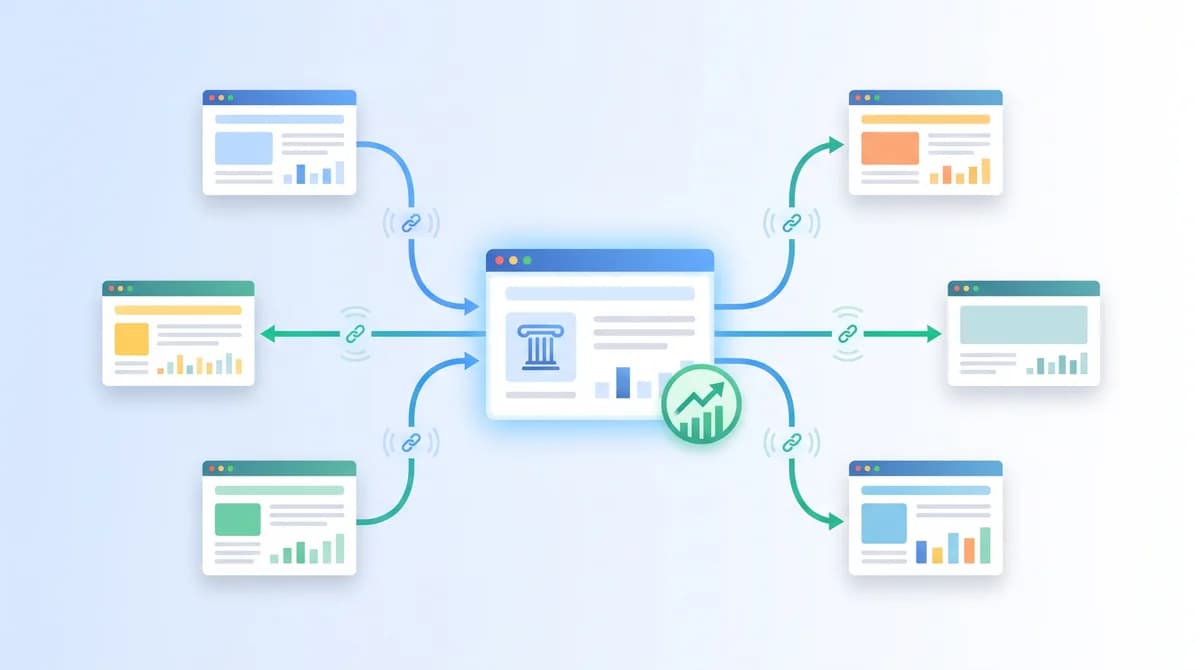
Most website owners spend countless hours chasing external backlinks from third-party blogs, digital PR placements, and industry directories while overlooking the highest-leverage ranking asset already sitting inside their own domain: internal links.
Every hyperlink you place from one page on your website to another helps search engines discover fresh URLs, map out topical relationships, and channel accumulated PageRank authority onto the exact pages you want ranking on page one. Even meticulous on-page SEO copywriting will struggle beyond position 20 if an article floats in isolation without strong internal pathways feeding it context and authority.
In this complete guide, you will learn how internal linking for SEO works under the hood, how link equity flows across a domain, how to architect hub-and-spoke topic clusters, how to write natural descriptive anchor text, and how to run a systematic internal link audit that eliminates orphan pages, broken URLs, and multi-hop redirects.
What Are Internal Links in SEO?#
An internal link is any hyperlink on a webpage that points to another URL within the same website domain. By contrast, an external (outbound) link points to a page hosted on a completely different third-party website.
In clean HTML, a crawlable internal link looks like this:
Search engines and visitors rely on two primary categories of internal links across every modern website, and each type serves a distinct structural role:
| Internal Link Category | Where It Appears | Primary Job | SEO Value & Signal Strength |
|---|---|---|---|
| Navigational Links | Top header menus, mega-menus, category sidebars, HTML breadcrumb trails, and site-wide footers | Establishes global information architecture and lets users jump quickly between main hubs | High crawl reachability across every template, though repeated boilerplate anchor text carries diluted contextual specificity |
| Contextual (Editorial) Links | Placed inline inside article body paragraphs, comparison tables, callout boxes, and curated resource sections | Connects readers and search bots from one specific concept directly to a deeper guide or interactive tool | Highest topical relevance signal because surrounding prose and tailored anchor text prove semantic context |
| Taxonomic & Archive Links | Category pills, tag archives, author archives, and paginated listing grids | Groups content logically by subject or format and ensures historical articles remain reachable | Valuable when kept clean and shallow, though deep pagination hurts crawl depth if unassisted by hubs |
Both systems complement each other. Global navigation builds the structural skeleton of your domain, while contextual internal links embedded inside your content supply the semantic connective tissue that demonstrates true topical expertise.
Breadcrumb Navigation vs. Related Posts Widgets
Many publishing platforms automate internal links through breadcrumb trails (`Home > Blog > On-Page SEO > Internal Linking`) and automated "Related Articles" grids below each post:
- Breadcrumbs reinforce site hierarchy cleanly at the top of every page and link every child post straight back up to its category hub in one click.
- Automated "Related Posts" widgets add helpful fallback connectivity—especially on large sites—but rarely match the editorial precision of manual contextual links placed right beside a relevant subheading where a reader actually wants the next explanation.
Why Internal Linking Matters for Rankings and User Experience#
Before placing links across articles, it helps to understand the four interconnected mechanisms through which smart internal linking lifts organic visibility and user engagement.
1. Accelerates Crawling and URL Discovery
As explained in our foundational walkthrough of [how search engines work](/blog/how-search-engines-work), search engine crawlers move through the web primarily by following <a href> links from known pages to unfamiliar URLs. When you publish a brand-new guide and immediately link to it from several high-traffic existing articles—instead of waiting passively for crawlers to poll your XML sitemap—search bots discover, render, and index the new URL dramatically faster.
2. Distributes Internal Link Equity (PageRank)
Every domain develops an uneven authority profile over time. Typically, your homepage attracts the strongest share of external backlinks, brand citations, and direct visits, followed by interactive free tools and flagship pillar guides.
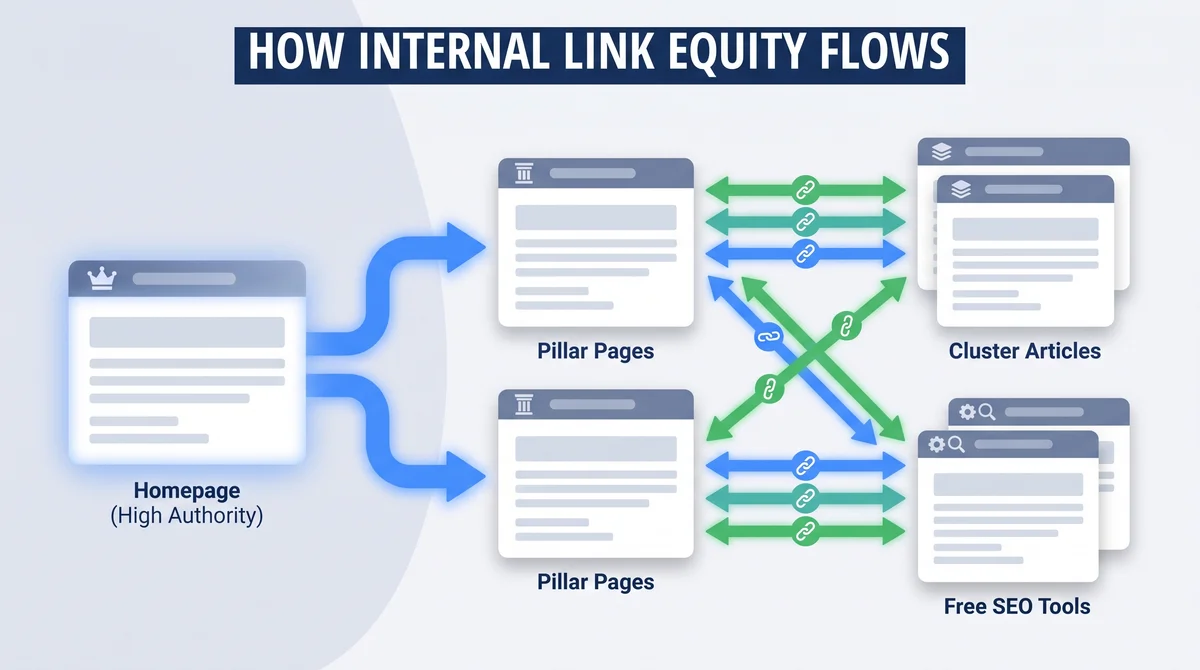
Internal links serve as the plumbing system for that internal link equity (PageRank):
- When an authoritative page links to ten subpages without bloated template clutter, each destination page inherits a meaningful share of ranking strength.
- When you link intentionally from top external-backlink magnets straight to competitive guides or commercial landing pages stuck in positions 5 through 15, you transfer real ranking momentum onto pages that convert visitors.
- Conversely, if your highest-authority pages never link into your new cluster content or product pages, that accumulated PageRank pools in a corner instead of lifting the rest of your domain.
3. Builds Topical Authority and Semantic Context
Modern search engines evaluate far more than isolated keyword appearances on a single URL. Google looks across your entire domain to assess topical completeness and organization.
When a user or crawler moves effortlessly between closely connected tutorials—such as reading about keyword mapping for SEO, learning how to control crawlers with robots.txt and XML sitemaps, resolving duplicates with canonical tags and redirects, and validating everything inside a technical SEO audit—your internal link graph demonstrates cohesive subject mastery rather than scattered one-off blogging.
4. Boosts Engagement, Dwell Time, and Product Conversions
Helpful internal linking transforms static articles into interactive learning paths. Someone researching why duplicate URLs split ranking value can jump straight into fixing them or running a live scan inside the Canonical URL Checker or Free SEO Analyzer. Satisfying the reader's next logical question reduces bounce-backs to the SERP and increases pages per session organically.
Hub-and-Spoke Topic Clusters vs. Orphan Pages#
Dropping two random links at the very bottom of an article rarely creates lasting authority. High-growth content websites design their internal linking architecture deliberately around hub-and-spoke topic clusters.
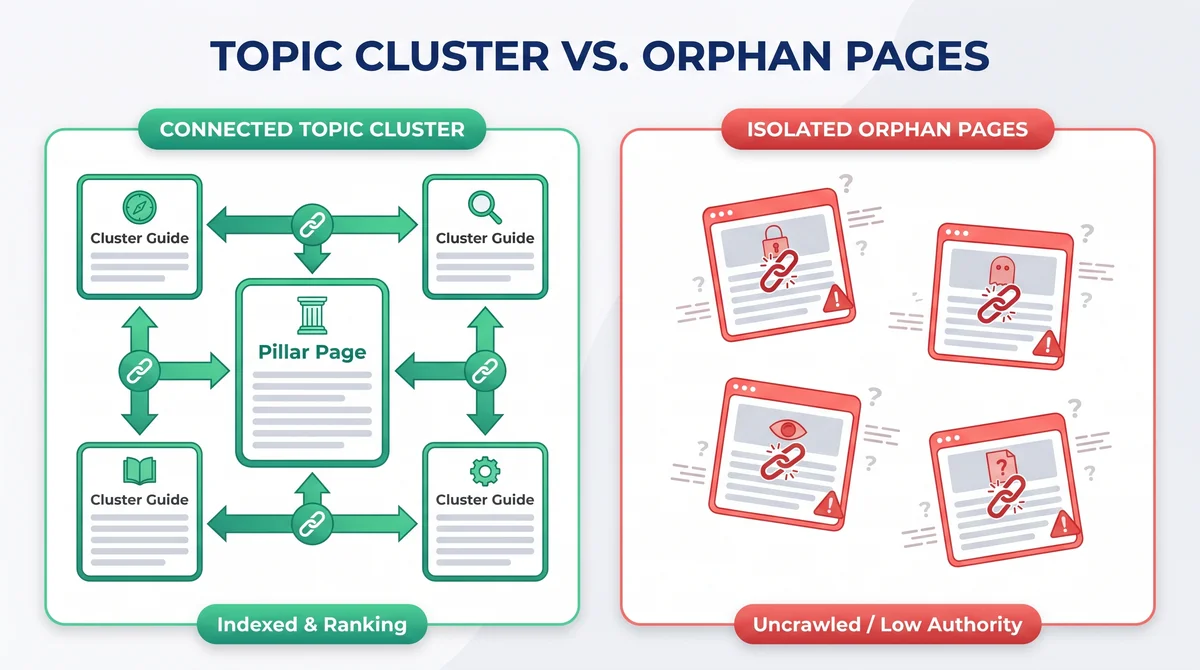
The Three-Way Linking Pattern of a Connected Topic Cluster
Every healthy topic cluster relies on consistent bidirectional links connecting three layers of content:
- Pillar-to-Cluster Links (Top-Down): One authoritative pillar page covering a broad core subject (such as On-Page SEO, Keyword Research, or Technical SEO Audit) links downward to every specialized supporting guide inside its cluster.
- Cluster-to-Pillar Links (Bottom-Up): Every supporting cluster guide links back up to its parent pillar page within the opening section or core conceptual bridge, reinforcing which URL represents the flagship hub for the broad topic.
- Cluster-to-Cluster & Actionable Tool Links (Lateral): Sibling guides within the cluster link horizontally wherever topics overlap, and channel qualified visitors straight to relevant utility pages and free tools.
Example Internal Linking Blueprint Matrix
Instead of guessing which links belong where, document your linking plan alongside your keyword mapping spreadsheet:
| Source Page | Target Page | Recommended Anchor Text | Ideal Placement |
|---|---|---|---|
Pillar: /blog/technical-seo-audit | /blog/robots-txt-and-xml-sitemaps | Robots.txt and XML Sitemaps | Crawling & discovery section |
Pillar: /blog/technical-seo-audit | /blog/canonical-tags-and-redirects | Canonical Tags and Redirects | Duplicate content & indexation checks |
Cluster: /blog/robots-txt-and-xml-sitemaps | /tools/robots-txt-tester | Robots.txt Tester | Testing directives callout box |
Cluster: /blog/canonical-tags-and-redirects | /tools/redirect-chain-analyzer | Redirect Chain Analyzer | Flattening multi-hop chains section |
Cluster: /blog/internal-linking-for-seo | /tools/broken-link-checker | Broken Link Checker | Auditing broken internal paths |
Why Orphan Pages Silently Fail
On the right panel of the comparison diagram above sits one of the most frequent structural defects uncovered in technical audits: orphan pages.
An orphan page is a live `200 OK` webpage that receives zero incoming internal links from any other crawled page on your site. Even if an orphan URL is submitted in your XML sitemap, having zero internal links tells search crawlers that the page is unreferenced, disconnected from your main topic clusters, and unimportant to site visitors. As a result, orphan pages struggle to get recrawled frequently, miss out on PageRank distribution, and often get dropped from Google's index under "Crawled – currently not indexed".
*(Note: "Near-orphan pages"—pages linked exclusively from page 12 of an archive or one unrelated post—suffer nearly the same fate. Aim for at least 3 to 5 relevant contextual links pointing into every important guide.)*
Anchor Text Strategy: How to Write Internal Link Copy That Ranks#
Anchor text is the visible, clickable phrase inside an HTML link. Unlike external backlinks—where repetitive exact-match anchor text across third-party domains can trigger spam filters—Google explicitly relies on clear, descriptive internal anchor text to understand what a target page covers before even indexing the destination copy.
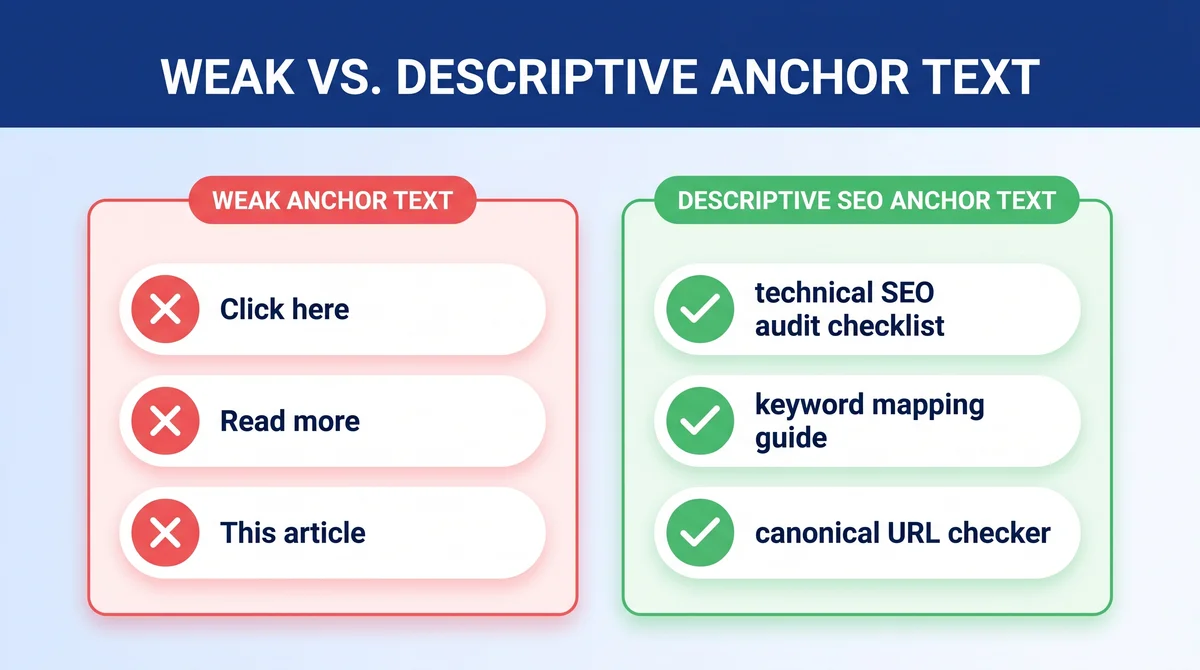
Think about how search bots read surrounding words: when five distinct articles link to `/blog/canonical-tags-and-redirects` using phrases like "canonical tags and 301 redirects", "fix duplicate URLs with rel=canonical", and "canonicalization guide", search algorithms build high confidence around every query that page deserves to rank for. When five articles instead link with "click here" or "check this guide", all of that topical clarity evaporates.
Anchor Text Comparison: What Works vs. What Wastes Signals
| Anchor Text Type | Example | SEO Signal Quality | When to Use |
|---|---|---|---|
| Generic Boilerplate | "Click here", "Read more", "Learn more", "This post" | Zero topical signal and poor screen-reader accessibility | Avoid completely inside body paragraphs |
| Bare Raw URL | https://flexaseo.com/blog/technical-seo-audit | Disruptive to human reading flow; weak semantic signal | Use only inside technical reference footnotes or docs |
| Natural Partial-Match | "complete guide to flattening redirect chains" | Optimal balance: reads conversationally while embedding key concepts | Primary choice (~60%–70% of contextual links) |
| Concise Exact-Match | "technical SEO audit checklist" | Direct topical alignment with the destination's target primary keyword | Secondary choice (~20%–30%), varied across pages |
| Branded or Tool Name | "Free SEO Analyzer", "Broken Link Checker" | Connects branded terms and interactive features to clear intent | Ideal for linking into live tools, templates, and homepages |
Five Rules for High-Converting, SEO-Safe Internal Anchor Text
- Align Anchor Text With Your Keyword Map: Before choosing link phrasing, confirm the target page's unique primary topic in your keyword mapping framework. Never point two competing pages using the exact same primary keyword anchor text.
- Keep Clickable Text Concise (2 to 6 Words): Hyperlinking a 16-word full sentence dilutes focus around the core concept. Wrap the clean noun phrase or action verb + noun phrase instead.
- Never Neglect Image Link `alt` Attributes: Whenever a clickable card banner or thumbnail acts as an internal link with no visible anchor text inside the `<a>` tag, Google treats the `<img alt="...">` text as the link's anchor text. Write specific, descriptive alt attributes on every linked visual card.
- Place Target Keywords Naturally Without Awkward Grammar: Never break readable English to force exact query strings ("If you want internal linking for SEO best..."). Slight grammatical adaptations like "our guide to internal linking for SEO" read naturally and rank just as strongly.
- Respect Surrounding Sentence Context: Search engines analyze the sentence and paragraph around the link as well as the anchor itself, so introduce links where the surrounding explanation directly supports the destination topic.
Click Depth, Link Placement, and Technical Link Signals#
Not all links on a webpage carry equal weight. Understanding Google's "Reasonable Surfer" model—the principle that links more likely to be noticed and clicked by real humans pass stronger weight than buried template links—helps you place internal links more effectively.
1. Keep Important Pages Within 3 Clicks of the Homepage
Click depth (also called crawl depth) counts the minimum number of clicks required for a crawler or visitor to travel from the homepage (Depth 0) to a target URL:
- Depth 0: Homepage (
/) - Depth 1: Main hubs, key interactive tools, and featured resources linked directly in primary navigation (
/blog,/tools,/tools/seo-analyzer) - Depth 2: Pillar pages and guides linked cleanly from
/blogor hub landing pages - Depth 3: Supporting sub-guides linked from Depth 2 pillar pages
- Depth 4+: Buried posts accessible only by clicking
Next > Next > Nextthrough deep pagination
Search engines allocate significantly less crawl priority to URLs sitting 5, 6, or 10 clicks deep. Keep category archives organized, avoid deep paginated-only discovery, and surface key tutorials via topic hubs so every revenue page, free tool, and flagship article sits within 3 clicks of the homepage.
2. Prioritize Prominent In-Content Link Placement
A contextual link appearing naturally inside paragraphs 2 to 6—where readers engage most deeply—routinely receives far higher user click-through than an identical link tucked away at the very bottom footer. Put your most strategic upward pillar link or actionable tool link early in the flow where the reader encounters the problem you are solving.
3. Keep All Standard Internal Links Dofollow (Never Add rel="nofollow")
Wait: should you ever put rel="nofollow" on internal links to "hoard" PageRank for important pages?
No. Older "PageRank sculpting" tactics stopped working well over a decade ago. When you attach rel="nofollow" to an internal link, PageRank flowing out through that edge simply evaporates rather than redirecting elsewhere. Worse, nofollowing links can disrupt how Google traverses your site graph.
- Leave all internal navigation, footer, breadcrumb, and contextual links dofollow (plain
<a href="...">with norel="nofollow"). - If you want private utility routes (such as search pages, cart pages, or admin previews) excluded from Google's search results, use an explicit
<meta name="robots" content="noindex">directive on the target page instead—as detailed in our robots.txt and XML sitemaps guide.
4. Make Every Link a Crawl-Friendly HTML Tag
Googlebot parses standard HTML anchor elements (<a href="/path">) with resolved URLs reliably across both initial HTML downloads and JavaScript-rendered views. Never build site navigation using <span onclick="navigateTo(...)">, <button> redirects without real URLs, or empty href="#" placeholders—because crawlers do not treat click listeners as reliable crawl paths. In modern React and Next.js sites, always render standard <Link href="..."> components that compile down to clean <a> tags in server-rendered HTML.
5. Link Directly to Clean 200 OK Canonical URLs
Every time you move a post slug, remove a trailing slash, or consolidate duplicate pages, old internal links scattered across older posts often keep pointing at the retired URL. That forces crawlers and users through extra `301` redirect hops—or straight into a broken `404` page. Always link internally straight to the final `200 OK` HTTPS canonical URL. Check suspect links instantly using our HTTP Status Checker and Redirect Chain Analyzer.
How to Run a 6-Step Internal Linking Audit#
Whether your site has 15 URLs or 1,500 URLs, running this six-step quarterly internal linking audit exposes immediate ranking opportunities you can ship in a single afternoon:
- Export Your Highest-Authority Pages (Authority Donors): Check your top linked URLs in Google Search Console (Links → Top linked pages – externally). Your homepage and top 10 externally linked articles hold the largest reservoirs of link equity.
- Find High-Potential Pages Sitting Just Off Top 3 (Equity Recipients): Filter Google Search Console (*Performance → Search Results*) for high-impression keywords ranking between Positions 4 and 15 with strong content quality. Moving these URLs up two or three spots drives immediate organic clicks.
- Add Contextual Links From Donors to Recipients: Open your top authority donor pages, locate natural conceptual mentions, and weave 1–3 descriptive contextual links pointing directly into your Position 4–15 target guides or tool pages.
- Fix Every Broken Internal Link (`404`) and Internal Redirect (`301/302`): Scan key articles, hubs, and navigation templates using our [Broken Link Checker](/tools/broken-link-checker) to catch dead destinations, and run any redirecting paths through the [Redirect Chain Analyzer](/tools/redirect-chain-analyzer) so internal anchors hit final
200 OKURLs cleanly. - Identify and Rescue Orphan Pages: Compare all published
200 OKindexable URLs in your XML sitemap against the list of pages discovered via internal crawl paths. Whenever a valuable guide has zero or only one incoming link, link to it contextually from 3–5 related articles inside its topic cluster. - Verify Semantic Structure & Target Page Readiness: Before pushing authority into a destination page, confirm its headings (
H1→H2→H3) and on-page metadata are tight using our Heading Structure Checker and run a full technical verification inside the Free SEO Analyzer.
The "New Post Publishing" Reverse-Linking Habit
Make this a mandatory rule every single time you publish a new guide: do not hit publish and walk away. Instead, immediately open 3 to 5 existing published articles on related subtopics, edit relevant paragraphs to add natural contextual links pointing into your brand-new URL, and verify anchor text alignment with your keyword map. That single 10-minute habit prevents orphan pages permanently and gets new guides indexed in hours instead of weeks.
7 Common Internal Linking Mistakes That Hurt Rankings#
- Publishing Content Inside Dead-End Silos With Zero Inbound Links: Writing great guides that only link out while older high-traffic articles never link in leaves every new page stranded as a low-authority orphan.
- Over-Optimizing Every Anchor Text With Identical Exact-Match Strings: Stuffing identical exact-match anchor text across 30 footer or body links looks unnatural and weakens semantic variety. Mix partial-match phrases, natural descriptions, and occasional exact-match terms organically.
- Splitting Signals Across Competing Targets With Similar Anchor Text: Using "keyword research" to link interchangeably to three separate guides triggers keyword cannibalization signals instead of elevating one clear winner.
- Burying Crucial Pages Behind Pagination or JavaScript Filters Only: Relying on infinite scroll "Load More" buttons without clean crawlable
<a href="?page=2">pagination links blocks crawlers from reaching older articles beyond page one. - Keeping Broken `404` Links and Multi-Hop Redirects Inside Navigation & Body Copy: Leaving outdated links after URL migrations wastes crawl budget and weakens user trust when visitors click dead links.
- Excessive Link Stuffing on Short Posts: Jamming 40 internal links into a 600-word article turns prose into a sea of blue underlined distractions and splits equity into tiny fragments. Keep links helpful, curated, and proportional to article depth.
- Linking Almost Exclusively to the Homepage Instead of Deep Pillar & Tool Pages: Global header logos already link to
/from every URL on your domain. Spend precious body-content links strengthening specific pillar guides, cluster articles, and specialized interactive tools.
Frequently Asked Questions#
How many internal links should an SEO article contain?
There is no rigid numeric limit—what matters is helpfulness and proportionality. A focused 1,000-word tutorial typically benefits from 3 to 6 well-placed contextual links, whereas a comprehensive 3,500-word pillar guide naturally links out 10 to 18 times to relevant deep-dive guides, definitions, and interactive tools without feeling cluttered.
Do links in navigation bars, sidebars, and footers pass the same value as body links?
No. While header navigation and breadcrumbs are crucial for keeping click depth shallow and confirming site hierarchy, contextual links placed inside unique editorial paragraphs pass stronger topical relevance because surrounding prose reinforces context and readers click them intentionally.
If two links on the same page point to the same URL, which anchor text counts?
Historically, Google often weighed the first anchor text appearing in HTML source order when two links on one page pointed to the exact same URL—meaning if a generic navigation dropdown or boilerplate "Read more" button sits above your carefully crafted body link, it could overshadow your descriptive anchor. Keep unique body links first where possible, and keep navigation labels concise and descriptive.
How can I quickly spot internal linking problems on my website?
Start by scanning key hubs and flagship articles with our [Broken Link Checker](/tools/broken-link-checker) to catch `404` errors, checking any redirected internal URLs with the [Redirect Chain Analyzer](/tools/redirect-chain-analyzer), and reviewing Google Search Console → Links → Internal links to identify important pages sitting near zero total internal links.
Is using target="_blank" on internal links bad for SEO?
`target="_blank"` does not directly harm search rankings, as bots follow `href` regardless of target attributes. However, for internal navigation between pages on the same domain, opening links in the same tab preserves cleaner browser history and Back-button behavior—especially on mobile devices.
How long does it take to see SEO ranking gains after improving internal links?
Because Google recrawls active internal links regularly—without waiting months for third-party websites to add backlinks—targeted internal linking improvements frequently surface measurable crawl, impression, and ranking improvements within 1 to 4 weeks, especially when connecting orphaned guides or passing equity from authority pages to page-two contenders.
Conclusion#
Internal linking is one of the highest-ROI levers in search engine optimization because you own the entire link graph—every pathway, anchor phrase, and topic hub sits completely under your control.
When you organize your content into connected hub-and-spoke topic clusters, eliminate orphan pages by reverse-linking from existing posts, write clear descriptive anchor text aligned with your [keyword mapping](/blog/keyword-mapping-for-seo) blueprint, and point links directly to clean 200 OK canonical URLs without redirect chains, every guide and tool on your website reinforces the rest.
Put this workflow into action today: audit existing pages with our Broken Link Checker, inspect internal hops using the Redirect Chain Analyzer, verify target HTTP responses in the HTTP Status Checker, and review complete page optimization inside the Free SEO Analyzer.