Keyword Mapping for SEO: How to Assign Keywords and Avoid Cannibalization
Learn how to build an SEO keyword map, assign primary and secondary keywords to the right URLs, build topic clusters, and prevent keyword cannibalization.
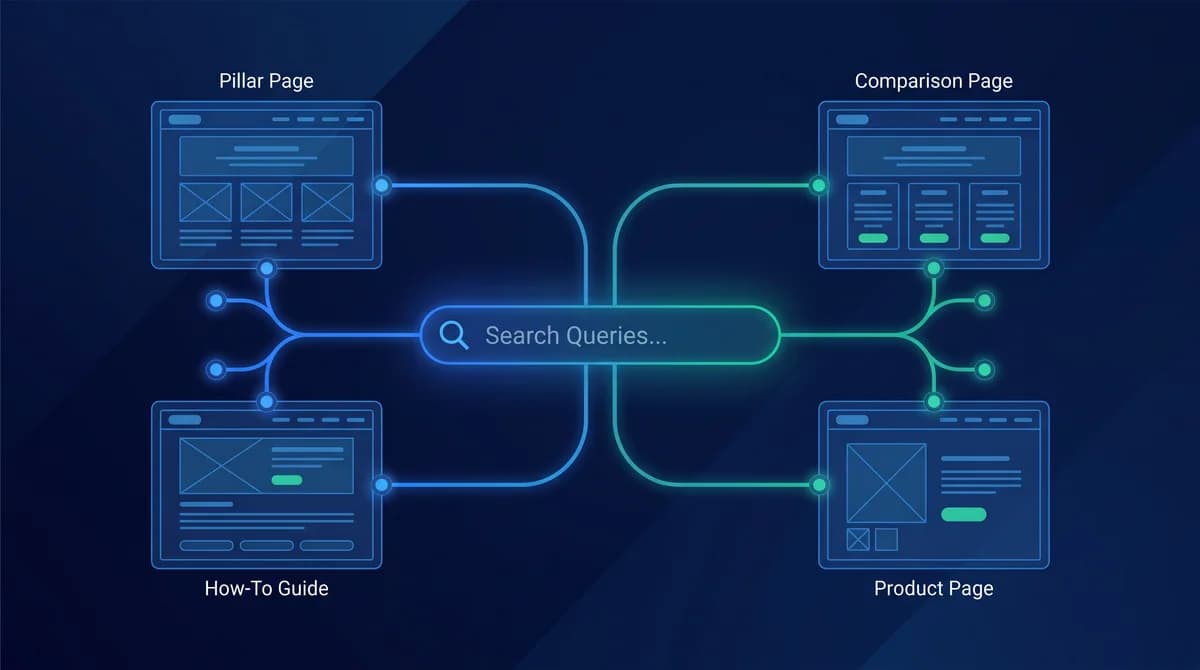
Discovering hundreds of promising search terms during [keyword research](/blog/keyword-research-for-seo) is exciting—until you face the practical question that stalls most content teams: Where do all of these keywords actually belong on your website?
Without a clear plan, writers and site owners tend to create a new blog post for every keyword variant they find, or stuff the same high-volume phrase into half a dozen similar pages. Within a few months, multiple URLs end up competing against one another in Google, rankings fluctuate unpredictably, and important product or service pages get outranked by tangential blog posts.
This is the exact problem keyword mapping solves.
Keyword mapping is the process of assigning specific primary and secondary keywords to individual pages across your website based on search intent and topical hierarchy. Instead of treating keywords as an unorganized checklist, a keyword map turns your research into an architectural blueprint where every URL has a distinct purpose, a clear target query, and defined internal link pathways.
In this guide, you will learn what keyword mapping is, how it prevents keyword cannibalization, how to build a keyword mapping spreadsheet from scratch, and how to connect your mapped pages into high-authority topic clusters.
What Is Keyword Mapping in SEO?#
Keyword mapping is the strategic discipline of pairing target search queries with specific destination URLs on your website—either existing pages that need optimization or planned pages in your editorial roadmap.
A well-structured keyword map answers four fundamental questions for every page on your site:
- What is the primary search intent this URL satisfies?
- Which single primary keyword best represents that core topic?
- Which secondary and [long-tail keywords](/blog/long-tail-keywords) belong on this same page as subheadings or supporting sections?
- Which pages deserves its own dedicated URL versus being merged into a broader guide?
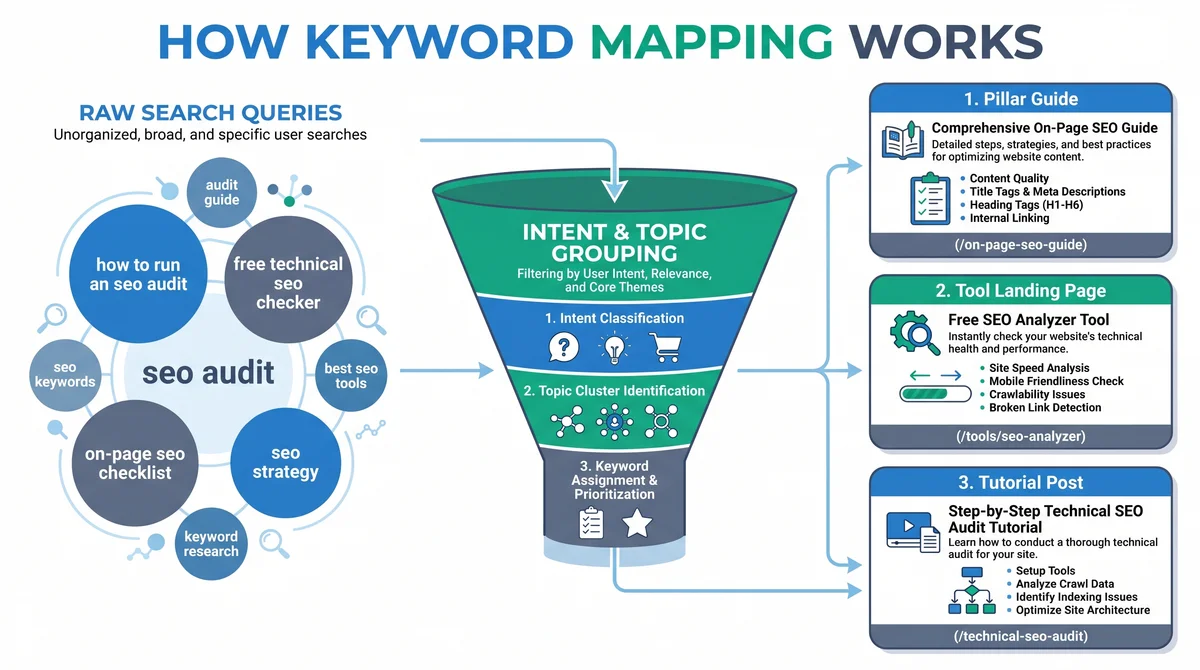
When search engines crawl your site, they evaluate not only individual pages in isolation, but also how your entire domain organizes and links information around a subject. As explained in our guide on how search engines work, search engine algorithms rely on clear topical boundaries, descriptive anchor text, and logical site structure to determine which URL is the canonical answer for a given query.
When you map keywords deliberately, you remove ambiguity for both human visitors and search engine crawlers.
Primary vs. Secondary Keywords on a Mapped Page
A common misconception among beginners is that one page can only rank for one keyword. In reality, a single well-optimized page often ranks for hundreds of close keyword variations—provided those variations share the same search intent.
| Keyword Role | Definition | Typical Placement on the Page | Example (Target URL: /blog/keyword-mapping-for-seo) |
|---|---|---|---|
| Primary Keyword | The main search query that defines the core topic and intent of the URL | URL slug, title tag, meta description, H1 heading, opening paragraph | keyword mapping |
| Secondary Keywords | Close synonyms, subtopics, and modifier variations that share the same search intent | H2 and H3 subheadings, body paragraphs, image alt attributes | keyword mapping for SEO, how to map keywords, keyword mapping template |
| Supporting Questions | Specific long-tail queries and "People Also Ask" questions related to the core topic | Dedicated H3 subsections, comparison tables, FAQ blocks | how does keyword mapping prevent cannibalization?, how many keywords per page? |
By grouping one primary keyword with several closely related secondary phrases on a single page, you build comprehensive coverage without spinning up thin, redundant URLs.
Why Keyword Mapping Matters for Organic Growth#
Skipping keyword mapping might save an hour during planning, but it creates structural debt that compounds as your website grows from 10 pages to 100 or 1,000 pages. Here are the five core benefits of maintaining a living keyword map.
1. Eliminates Keyword Cannibalization
Keyword cannibalization happens when two or more pages on the same domain target the same primary keyword and satisfy the same search intent. Instead of doubling your chances of ranking, overlapping pages force your own URLs to compete against each other.
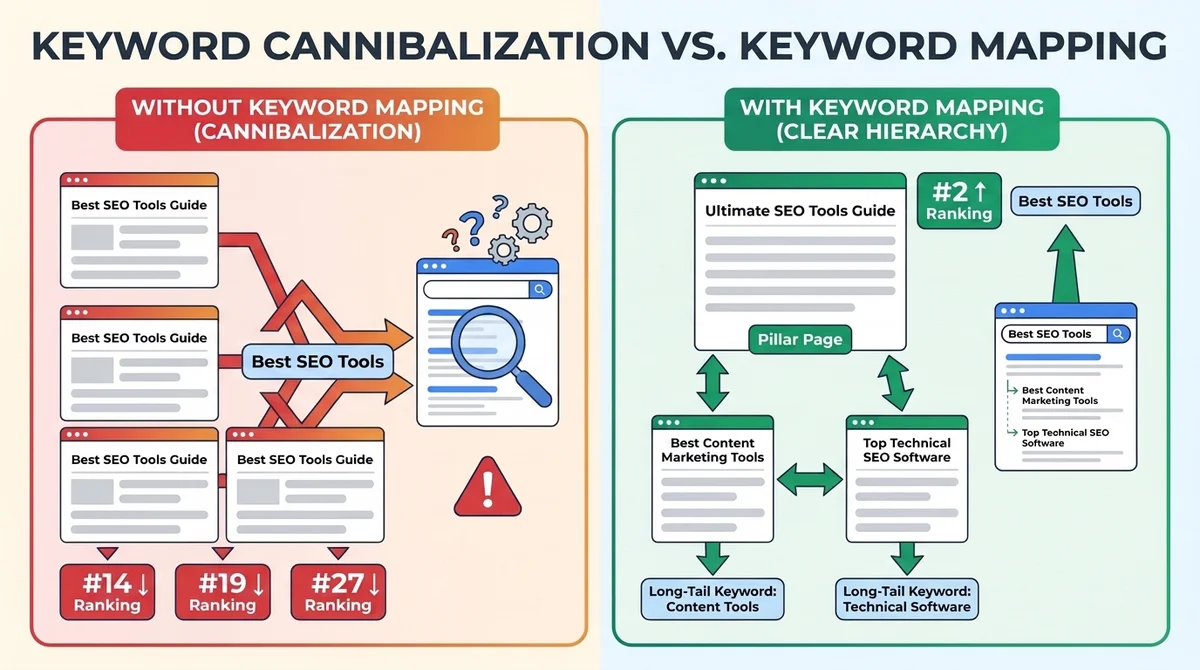
When multiple pages target the same intent:
- Backlink authority splits across two or three separate URLs instead of consolidating into one powerhouse resource.
- Internal anchor text becomes inconsistent, sending mixed signals to crawlers about which page is the primary authority.
- Rankings yo-yo in the SERPs as Google repeatedly swaps which URL it tests on page two or page three.
- Conversion rates drop when an informational blog post accidentally outranks a commercial product page for a buying query.
A keyword map enforces a strict rule: one primary intent equals one canonical URL.
2. Aligns Content Formats With Search Intent
During keyword research, you will encounter queries that look similar on the surface but carry very different user expectations. Consider the difference between these four queries:
- "what is email marketing" → Informational beginner guide
- "email marketing vs marketing automation" → Commercial comparison article
- "email marketing software pricing" → Product or pricing landing page
- "free email subject line tester" → Interactive browser tool
Mapping forces you to inspect the live search results and match each query group to the exact page format—pillar guide, tutorial, comparison page, category hub, or interactive tool—that searchers expect to see.
3. Powers Topic Clusters and Pillar Pages
Modern SEO rewards topical authority over isolated, one-off articles. When you organize your keyword map into topic clusters, you pair a broad, high-volume pillar page (targeting a short-tail or mid-tail keyword) with a network of specific cluster articles (targeting focused long-tail queries).
Because every relationship is documented in your keyword map, writers know right away which pillar page to link back to and which sibling cluster posts to cross-reference.
4. Uncovers High-Value Content Gaps
Once you map your existing URLs against your researched keyword universe, gaps jump off the screen immediately. You might discover that you have five top-of-funnel informational posts about a topic, zero middle-of-funnel comparison pages, and no dedicated landing page for your highest-converting service modifier.
5. Simplifies On-Page Optimization and Auditing
When every URL has a documented primary keyword and secondary keyword cluster, executing on-page SEO becomes straightforward. You can run any mapped URL through the Free SEO Analyzer, check heading hierarchy with the Heading Structure Checker, and verify natural term usage with the Keyword Density Checker against a clear benchmark.
The 6-Step Keyword Mapping Workflow#
Whether you are launching a brand-new site or untangling a five-year-old blog, follow this repeatable six-step process to build your keyword map.
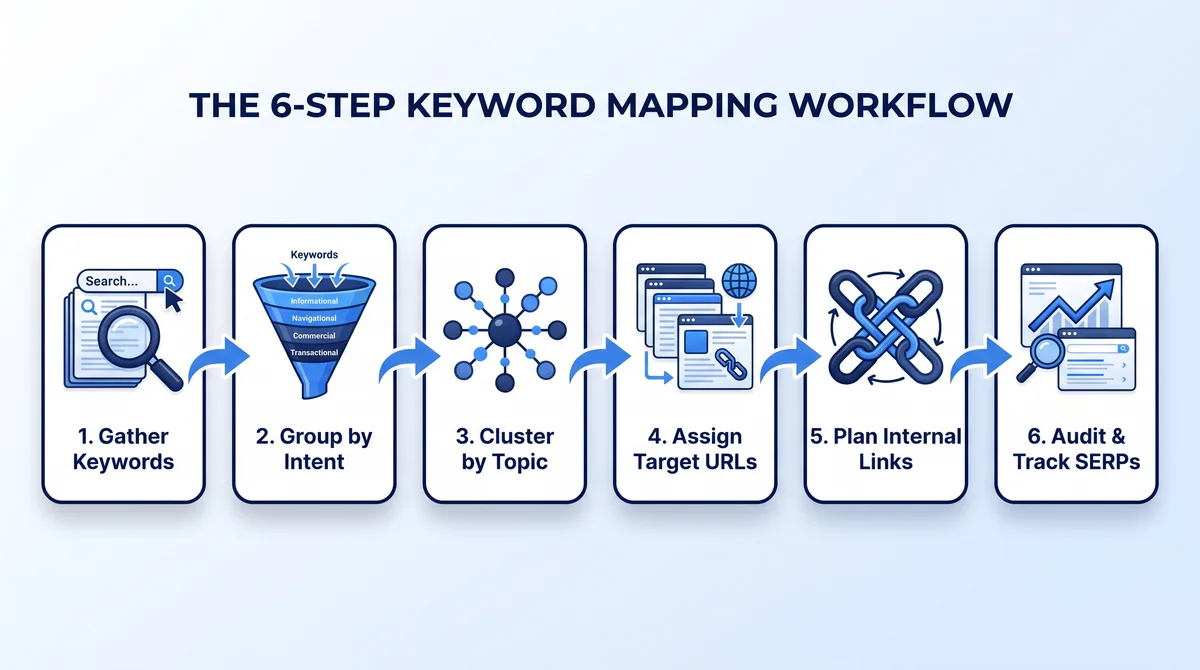
Step 1: Gather Your Complete Keyword Universe and Existing URLs
Start by assembling two lists in one workspace:
- Your existing URL inventory: Export all indexable pages from your XML sitemap, Google Search Console, or crawler—including home, product/service pages, category pages, interactive tools, and blog posts.
- Your researched keyword pool: Pull seed terms, competitor rankings, autocomplete suggestions, and long-tail variations across your core topics, along with estimated search volume and keyword difficulty.
Do not filter aggressively yet. Your goal in Step 1 is to get every candidate query and every active URL visible in one place.
Step 2: Group Keywords by SERP Similarity and Search Intent
Next, sort your raw keyword list into tight semantic buckets. The golden rule of keyword clustering is SERP overlap:
"The SERP Overlap Rule: If two keywords return largely the same top 10 organic pages in Google—and require the same content format to satisfy the user—they belong on the same page. If Google shows completely different pages or content formats for the two queries, they belong on separate URLs.
For example, consider these three queries:
how to map keywords for seokeyword mapping processseo keyword mapping guide
If you search all three in Google, you will see the same comprehensive tutorials ranking in the top positions. Creating three separate articles for those three phrases would guarantee keyword cannibalization. They belong in a single bucket mapped to one comprehensive guide.
By contrast, compare:
what is keyword difficulty(Informational guide explaining KD scores)keyword mapping for seo(Actionable guide on assigning keywords to URLs)
Even though both belong to the broader Keyword Research category, their search results have zero URL overlap because the user needs two distinct answers. Therefore, each gets its own dedicated article.
Step 3: Designate One Primary Keyword and Secondary Variants per Bucket
Within each intent bucket, assign roles to your keywords:
- Select the Primary Keyword: Choose the phrase that best captures the core topic, balances realistic keyword difficulty with meaningful search demand, and reads naturally in a title tag and URL slug.
- Assign Secondary Keywords: List 3 to 8 close variations, subtopics, and modifier phrases that expand the page's depth.
- Note Long-Tail Question Keywords: Pull out 3 to 6 "how," "why," or "what" questions to structure your H2/H3 outline and FAQ section.
Step 4: Map Each Keyword Bucket to an Existing or Planned URL
Now connect each keyword bucket to a specific destination on your website. Every bucket will fall into one of four action statuses:
| Action Status | When to Use It | Next Step |
|---|---|---|
| Optimize Existing URL | You already have a relevant live page targeting this exact intent | Update the page's title tag, headings, body depth, and internal links to match the mapped keyword cluster |
| Create New URL | No existing page on your site satisfies this search intent | Add the proposed URL slug, content format, and target outline to your editorial calendar |
| Merge & Redirect (301) | Two or more existing pages compete for the same keyword bucket | Combine the best sections into the stronger URL and set up a permanent 301 redirect from the retired URL |
| Re-angle / Differentiate | Two pages overlap slightly, but each can serve a distinct intent | Re-map one page to a more specific long-tail or commercial angle and update its canonical and headings |
Step 5: Draft On-Page Targets in Your Keyword Mapping Spreadsheet
A keyword map is only useful if writers and editors can act on it immediately. For every mapped URL, document the target URL slug, page type, search intent, primary keyword, secondary keywords, target H1/title direction, and the parent pillar page it supports.
Step 6: Connect Topic Clusters With Intentional Internal Links
Finally, map how link equity and readers will flow between pages:
- Pillar-to-Cluster Links: Your broad pillar page (for example, [How to Do Keyword Research for SEO](/blog/keyword-research-for-seo)) should link out to every specialized cluster guide (Long-Tail Keywords, Keyword Difficulty, Keyword Mapping) using descriptive anchor text.
- Cluster-to-Pillar Links: Every supporting cluster article should link back up to its parent pillar page early in the content.
- Cluster-to-Cluster & Tool Links: Sibling articles should cross-link contextually where topics intersect, and funnel readers toward actionable tools like the Free SEO Analyzer or SERP Preview Tool.
Practical Keyword Mapping Spreadsheet Template#
Below is a real-world example of what a completed keyword map looks like for an SEO education and tools website. You can replicate these exact columns in Google Sheets, Excel, Notion, or Airtable.
| Target URL Slug | Page Type | Search Intent | Primary Keyword | Secondary & Long-Tail Keywords | Est. KD | Status | Parent Pillar / Internal Link Target |
|---|---|---|---|---|---|---|---|
/blog/keyword-research-for-seo | Pillar Guide | Informational | keyword research for seo | how to do keyword research, seo keyword research process, finding seo keywords | 62 | Published | Links to all Keyword Research cluster guides & /tools/seo-analyzer |
/blog/short-tail-vs-long-tail-keywords | Cluster Article | Informational | short-tail vs long-tail keywords | short tail keywords, long tail vs short tail seo, keyword specificity | 28 | Published | Links to /blog/keyword-research-for-seo & /blog/long-tail-keywords |
/blog/long-tail-keywords | Cluster Article | Informational | long-tail keywords | what are long-tail keywords, how to find long-tail keywords, long-tail keyword examples | 34 | Published | Links to /blog/keyword-research-for-seo & /blog/keyword-difficulty |
/blog/keyword-difficulty | Cluster Article | Informational | keyword difficulty | what is keyword difficulty, kd score explained, how to evaluate keyword competition | 39 | Published | Links to /blog/keyword-research-for-seo & /blog/keyword-mapping-for-seo |
/blog/keyword-mapping-for-seo | Cluster Article | Informational | keyword mapping | keyword mapping for seo, avoid keyword cannibalization, keyword mapping template | 26 | Published | Links to /blog/keyword-research-for-seo & /blog/on-page-seo-guide |
/tools/keyword-density-checker | Interactive Tool | Transactional / Tool | keyword density checker | check keyword density online, tf-idf keyword analyzer, word frequency tool | 31 | Live Tool | Linked from /blog/on-page-seo-guide & /blog/keyword-mapping-for-seo |
Notice how zero URLs in this table fight over the same primary keyword. Each page owns a crystal-clear slice of the topic and reinforces its neighbors through internal links.
How to Audit Your Existing Website for Keyword Cannibalization#
If your website already has dozens or hundreds of published pages, your first keyword mapping session should double as a cannibalization audit. Here are four reliable ways to spot overlapping pages before publishing new content:
1. Run a site: Search in Google
Type site:yourdomain.com "target keyword" into Google. Look at the top three to five results returned from your domain. Ask yourself:
- Are two different blog posts trying to answer the exact same question?
- Do two URLs have nearly identical title tags or H1 headings?
2. Inspect Google Search Console Performance by Query
Open Google Search Console → Performance → Search Results, click on a core keyword query, and switch from the Queries tab to the Pages tab.
If one page receives 90%+ of the clicks and impressions for that query, your keyword mapping is clean. However, if you see two or three different URLs trading impressions back and forth over a 90-day period—with neither page breaking into the top 5—you have active keyword cannibalization.
3. Verify Canonical Tags and Redirect Chains
Sometimes duplicate competition happens accidentally because of technical issues: trailing-slash variations, HTTP vs. HTTPS versions, parameterized URLs, or old draft slugs left indexed. Use the Canonical URL Checker to confirm that every page declares a single self-referencing canonical URL (or points properly to its consolidated master page), and test merged URLs with the Redirect Chain Analyzer so 301 redirects resolve in a single hop.
4. Compare On-Page Headings and Title Tags
Audit competing pages side by side using the Heading Structure Checker and SERP Preview Tool. If Page A and Page B both lead with near-identical H1s and H2s, merge the thin page into the stronger URL or pivot one page toward a distinct industry use case or funnel stage.
7 Common Keyword Mapping Mistakes to Avoid#
Even experienced marketers fall into traps when building a keyword map. Watch out for these seven mistakes:
1. Creating Separate Pages for Plurals, Synonyms, and Word-Order Variants
Search engines have understood semantic equivalence for years. You do not need separate pages for "SEO audit checklist," "checklist for SEO audits," and "SEO auditing checklists." Map all close grammatical variants to a single authoritative URL.
2. Mapping by Keyword Volume Instead of Search Intent
Never assign a high-volume informational query to a transactional product page just because you want that product page to get more traffic. If the live SERP shows 2,500-word educational tutorials, a product sales page will struggle to rank. Map the informational query to an educational guide, and funnel readers to your product page via contextual internal links and calls to action.
3. Leaving Commercial and Tool Pages Out of the Keyword Map
Many teams only map blog posts and forget their homepage, category hubs, feature pages, and free tools. Your commercial pages and interactive utilities should sit at the center of your keyword map so your informational content actively supports them.
4. Forgetting to Update Internal Anchor Text After Re-Mapping
When you merge two cannibalizing articles or assign a new primary keyword to an existing URL, old internal links across your site might still point to the redirected URL or use outdated anchor text. Update your internal links so anchor text naturally reflects each destination page's mapped primary or secondary keywords.
5. Stuffing Every Mapped Secondary Keyword Into Every Paragraph
A keyword map tells you which subtopics belong on a page—not how many times to repeat a phrase. Use secondary keywords naturally in H2/H3 subheadings and relevant sections, and verify balanced usage with the Keyword Density Checker.
6. Mapping Unwinnable Head Terms to Weak Pages Without Supporting Clusters
Assigning a KD 85 short-tail keyword to a brand-new page with zero supporting cluster articles rarely works. Build momentum by publishing and interlinking your low-to-moderate difficulty cluster articles first, then let their combined internal link authority lift the pillar page.
7. Treating Your Keyword Map as a One-Time Document
Search intent shifts, new competitors enter the SERPs, and your site's authority grows over time. Review and update your keyword map at least once per quarter—and always check it before approving any new article brief.
Frequently Asked Questions#
How many keywords should I map to a single page?
Assign one primary keyword that defines the core topic and URL slug, paired with 3 to 10 secondary and long-tail keywords that share the exact same search intent. A comprehensive guide will naturally end up ranking for dozens or even hundreds of long-tail variations once indexed, so focus on covering the core subtopics thoroughly rather than listing every possible phrasing.
What is the difference between keyword research and keyword mapping?
[Keyword research](/blog/keyword-research-for-seo) is the discovery and evaluation phase—finding what your audience searches for, analyzing search volume, checking [keyword difficulty](/blog/keyword-difficulty), and identifying search intent. Keyword mapping is the architectural phase that follows: assigning those vetted keywords to specific existing or planned URLs on your website so every page has a clear role.
How do I fix keyword cannibalization once I find it in my keyword map?
You have three primary fixes depending on the value of the competing pages:
- Merge and 301 Redirect: If two pages cover the same topic and intent, combine the best sections into the stronger URL, delete the weaker page, and implement a 301 redirect.
- Re-angle one of the pages: If both pages are valuable, pivot one page to target a different long-tail modifier, audience segment, or funnel stage, and update its title tag, H1, and internal links.
- Canonicalize: In rare cases where duplicate or near-duplicate views must exist for users (such as filtered e-commerce sorting views), point a
rel="canonical"tag to the primary mapped URL.
Should every page on my website have a mapped keyword?
Every page that you want to rank in organic search—including your homepage, core product or service pages, category hubs, tools, and blog articles—should have a mapped primary keyword and clear search intent. Purely utility or legal pages (such as your Privacy Policy, Terms of Service, or account login screens) do not need keyword targeting.
How often should I update my SEO keyword map?
Check your keyword map every time you plan new content so you never commission a duplicate article. Beyond daily editorial use, conduct a quarterly review using Google Search Console data to check whether mapped pages are ranking for their intended queries or if new content gaps have emerged.
Can two pages target the same topic if their search intent is different?
Yes—as long as the search intent and SERP results are genuinely distinct. For example, a site can have an informational guide on [Title Tags and Meta Descriptions](/blog/title-tags-and-meta-descriptions) (targeting users who want to learn copywriting formulas and pixel limits) alongside an interactive [Meta Tags Generator](/tools/meta-tags-generator) (targeting users who want a tool to generate HTML tags immediately). Because the queries and user expectations differ, both pages complement each other rather than cannibalizing rankings.
Conclusion#
Keyword mapping is the bridge between raw keyword data and a high-ranking website architecture. Without a map, even the most thorough keyword research eventually degrades into overlapping articles, diluted backlinks, and stalled rankings.
By grouping queries by live SERP intent, assigning one clear primary keyword to each canonical URL, documenting your pages in a central spreadsheet, and connecting pillar and cluster pages with intentional internal links, you transform every new piece of content into a compounding asset.
Before publishing your next article, map its primary and secondary keywords, check your on-page structure with our Free SEO Analyzer, and preview how your mapped title tag and snippet will look in Google using the SERP Preview Tool.
Once every URL in your spreadsheet has an assigned primary keyword, strengthen your cluster rankings with our complete guide to Internal Linking for SEO and learn when to use Canonical Tags and 301 Redirects to clean up overlapping URLs.