Title Tags and Meta Descriptions: How to Write SEO Snippets That Win Clicks
Master title tags and meta descriptions with proven copywriting formulas, pixel and character limits, real examples, and tips to prevent Google title rewrites.
Earning a page-one ranking in Google is only half the battle in search engine optimization. Once your page appears in the search results, it still has to convince a real human searcher to click your link instead of the nine other organic results, featured snippets, and ads competing for attention on the same screen.
That split-second decision comes down to your title tag and meta description.
Together, these two HTML elements form the foundation of your organic search snippet. Your title tag tells both search engines and users what your page is about, acting as a direct on-page SEO relevance signal and the clickable headline in the SERPs. Your meta description acts as your elevator pitch underneath that headline, summarizing the value on the page and persuading searchers that your link holds the exact answer they need.
In this guide, you will learn how title tags and meta descriptions work, the optimal character and pixel-width targets to prevent truncation, proven copywriting formulas for every page type, and how to stop search engines from rewriting your titles.
What Are Title Tags and Meta Descriptions?#
Title tags and meta descriptions are HTML elements placed inside the <head> section of a webpage that summarize the page's content for search engines, web browsers, and social sharing previews.
Here is how they appear in clean HTML source code:
While visitors rarely read your raw HTML source code, they interact with these two elements every day in four key places:
- Search Engine Results Pages (SERPs): The title tag renders as the large blue or purple clickable headline, while the meta description often appears as the two-line summary directly below it.
- Browser Tabs and Bookmarks: Web browsers display the
<title>text on open tab headers and use it as the default label when a user bookmarks a page. - External Anchor Text & Citations: Many third-party directories, forums, and automated tools pull your title tag automatically when linking to your URL.
- Social & Messaging Fallback Previews: When Open Graph (
og:title/og:description) tags are not separately specified, social platforms fall back to your HTML title tag and meta description. (You can inspect your social tags separately with our Open Graph Checker.)
Anatomy of a High-Converting Search Snippet#
Before writing a single character, it helps to examine how modern Google search results display a standard organic listing on desktop and mobile screens.
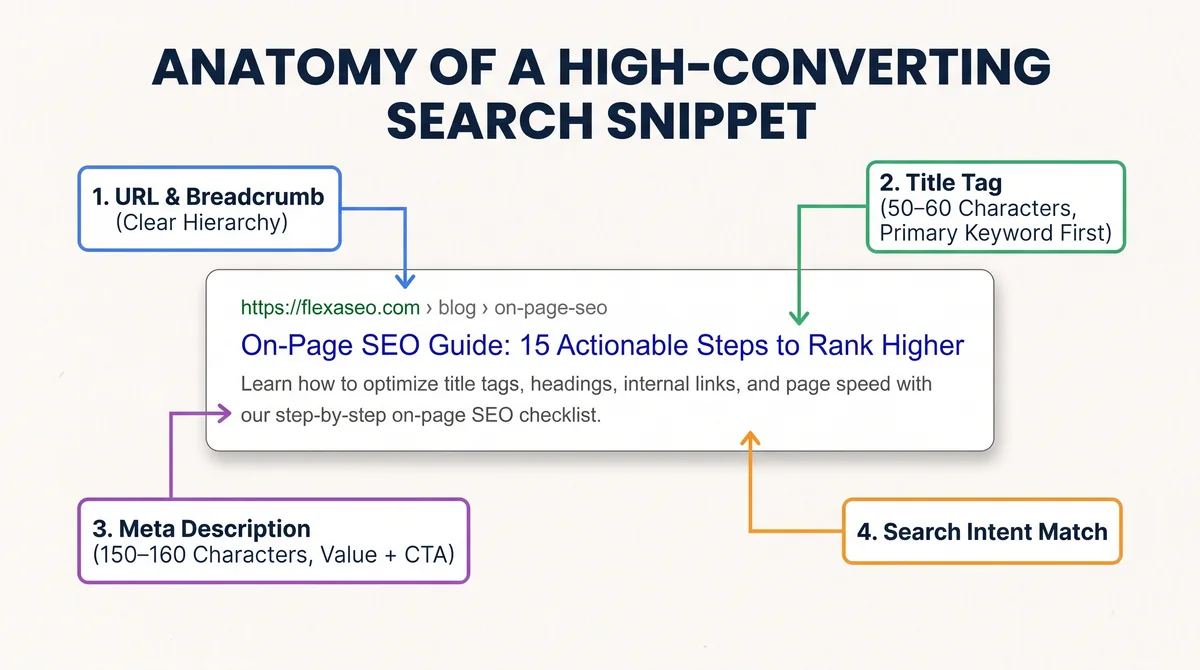
Every standard organic search snippet consists of four visual building blocks:
- Favicon, Site Name & URL Breadcrumb: At the top of the snippet, Google displays your site favicon, brand name, and a formatted breadcrumb path derived from your URL slug and structured data (for example,
flexaseo.com › blog › title-tags-and-meta-descriptions). - The Clickable Title Link (Title Tag): The primary headline in 20px font. It carries the strongest visual weight in the snippet and sets the user's expectation before they click.
- The Snippet Summary (Meta Description): Approximately 140 to 160 characters of descriptive copy below the headline. When a user's search terms appear inside your meta description, Google bolds those matching words—drawing the eye directly to your result.
- Optional Rich Result Enhancements: Depending on your page content and JSON-LD schema markup, snippets may also show publication dates, sitelinks, breadcrumb paths, or product details.
Because all four elements work together visually, you should always test how your draft title, URL slug, and meta description render together on desktop and mobile using a SERP Preview Tool or generate ready-to-paste HTML with the Meta Tags Generator.
How Title Tags and Meta Descriptions Impact SEO & CTR#
Marketers often ask whether title tags and meta descriptions are direct Google ranking factors. The answer differs sharply between the two elements—and understanding that distinction prevents common optimization mistakes.
| Attribute | HTML Title Tag (<title>) | Meta Description (<meta name="description">) |
|---|---|---|
| Direct Google Ranking Factor? | Yes. One of the strongest on-page topical relevance signals | No. Google does not use meta description text as a direct ranking signal |
| Impact on Click-Through Rate (CTR)? | Very High. The primary headline searchers scan first | High. Validates relevance, includes bolded query terms, and drives the click |
| Recommended Character Length | 50–60 characters | 140–160 characters (up to ~120 chars on compact mobile screens) |
| Approximate Desktop Pixel Limit | ~580–600 pixels max width | ~920–960 pixels max width (roughly two full lines) |
| Primary Keyword Placement | Front-loaded near the beginning of the title | Included naturally within the first sentence |
| Must Be Unique per Indexable URL? | Yes, strictly mandatory | Yes, strongly recommended |
Why Title Tags Directly Influence Rankings
When a search engine indexes a URL, the <title> tag is one of the primary signals it uses to understand the page's core topic and search intent. Placing your primary mapped keyword naturally in the title tag confirms to search algorithms that your page directly addresses that query.
Why Meta Descriptions Still Matter Even Without Direct Ranking Weight
In 2009, Google publicly confirmed that meta descriptions are not used as a direct ranking signal in its web search ranking algorithms. However, treating meta descriptions as an afterthought is a costly mistake:
- Higher Organic CTR Wins More Traffic From the Same Ranking Position: Moving a page's click-through rate from 3.2% to 6.4% at Position #3 literally doubles your organic traffic without moving up a single ranking spot.
- Bolded Query Terms Capture Visual Attention: When your meta description naturally includes the exact phrase or secondary keywords the user searched for, Google highlights those words in bold text, making your listing stand out against generic auto-generated excerpts.
- Pre-Qualifies Visitors and Reduces Pogo-Sticking: A clear, honest summary sets accurate expectations so visitors stay on your page rather than bouncing right back to the search results.
Weak Snippet vs. Optimized SEO Snippet#
To see the difference in action, compare how an unoptimized default snippet performs against an intentionally crafted title tag and meta description for the exact same page:
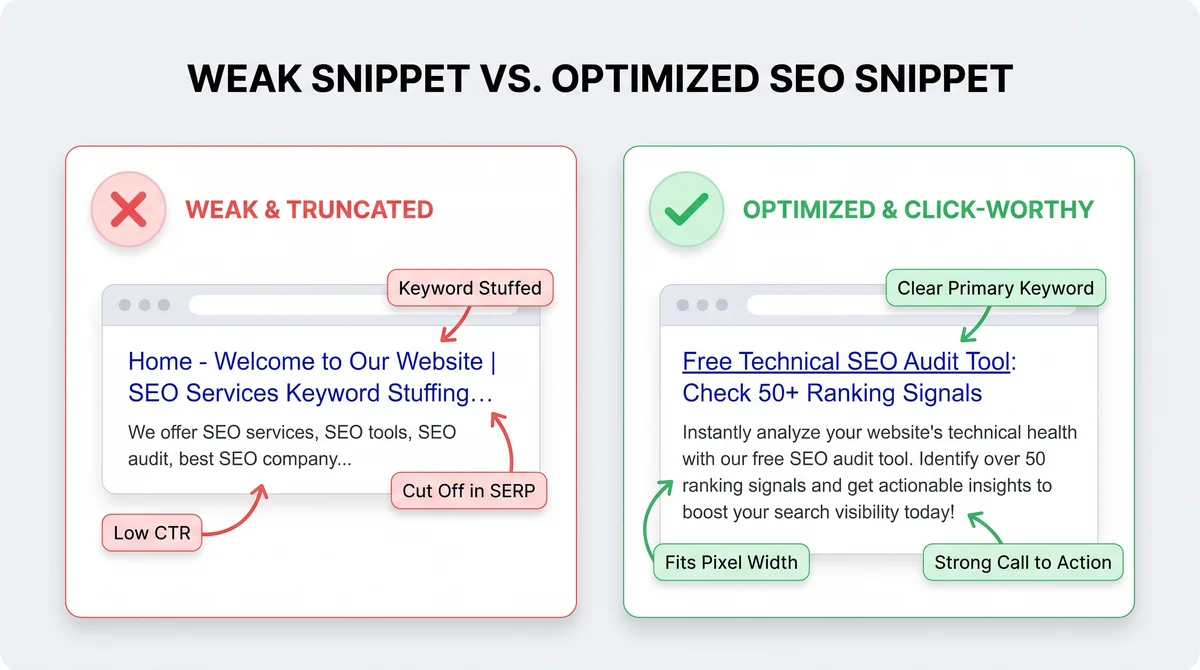
Notice why the weak snippet fails even if the underlying article is well written:
- Vague, Generic Title: "Home - Blog Post #4 | MyWebsite" wastes prime real estate on generic labels ("Home", "Blog Post #4") and omits the primary keyword entirely.
- Unfriendly URL Parameters:
mywebsite.com/p=123?id=bloggives the searcher zero contextual reassurance about what the page contains. - Truncated, Non-Specific Description: "Welcome to our website. In this article we are going to talk about some tips for your business that might help you grow..." burns 120 characters on filler throat-clearing without naming a single concrete takeaway or call to action.
By contrast, the optimized snippet pairs a clean URL slug (flexaseo.com › blog › seo-title-tags) with an intent-matched headline, a specific number or outcome, and a two-sentence meta description that tells the reader what they will learn and invites them to act.
Optimal Length: Pixel Width vs. Character Count Explained#
Most SEO checklists tell you to keep title tags under 60 characters and meta descriptions under 160 characters. That is a reliable rule of thumb—but under the hood, Google does not measure snippets by character count. It measures them by pixel width.
Because Google renders desktop title links in a proportional sans-serif font (Arial / Google Sans at 20px), different letters occupy very different horizontal widths:
- A capital `W` or `M` takes up roughly 17 to 19 pixels.
- A lowercase `i`, `l`, or pipe separator `|` takes up only 4 to 6 pixels.
That means a 54-character title packed with wide uppercase letters can truncate with an ellipsis (`...`), whereas a 63-character title using concise lowercase words and a pipe separator (`|`) can fit comfortably inside the ~580–600 pixel container.
Practical Length Guidelines for 2026
| Element | Safe Minimum | Sweet Spot Target | Hard Cutoff Risk Zone |
|---|---|---|---|
| Title Tag | 35 characters (~320px) | 50–60 characters (~480–580px) | Over 60 characters / >600px |
| Meta Description | 110 characters (~650px) | 140–160 characters (~820–920px) | Over 160 characters / >960px |
"Pro Tip: Instead of counting characters manually in a text editor, paste your draft title and description into our SERP Preview Tool to check both character count and visual rendering across desktop and mobile widths in real time.
The SEO Title & Meta Description Formula Blueprint#
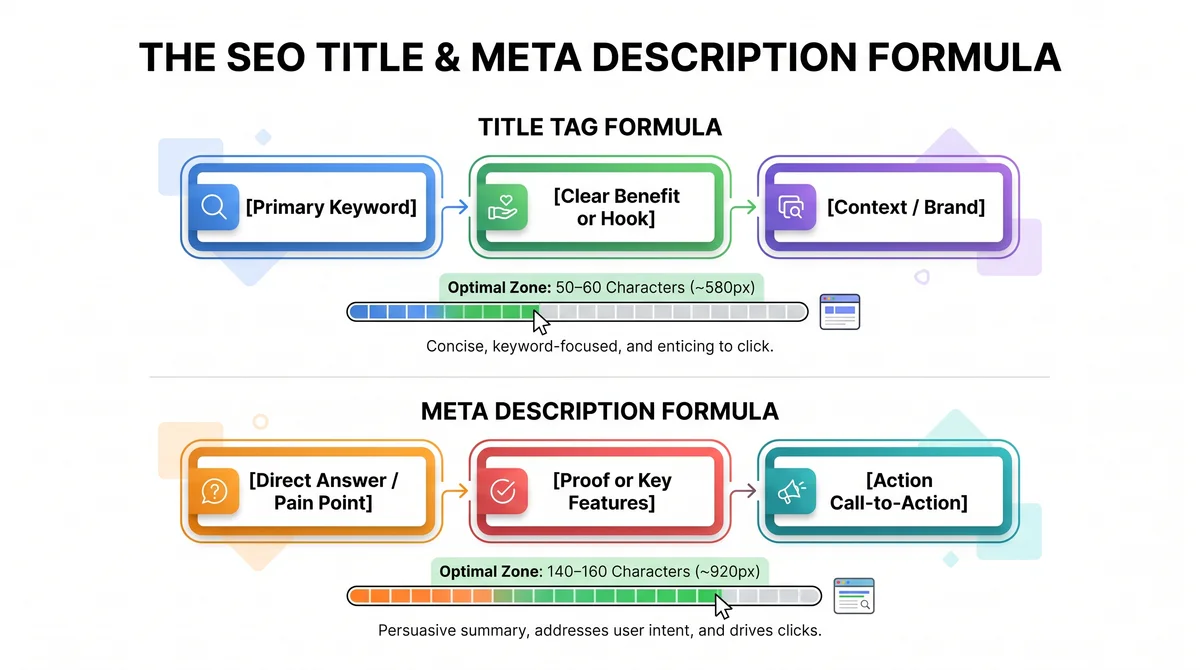
Writing snippets for dozens of pages becomes fast and consistent when you use modular copywriting formulas tailored to search intent.
The Modular Title Tag Formula
A high-performing SEO title tag combines three building blocks:
- Primary Keyword (Front-Loaded): Place your main mapped keyword within the first 3 to 5 words so both search engines and scanning eyes register immediate relevance.
- Value Hook, Qualifier, or Scope: Add the specific angle that makes your page worth clicking—such as a step-by-step promise, a concrete number, a target audience, or a practical deliverable ("Step-by-Step Guide," "15 Critical Checks," "With Templates & Examples").
- Optional Brand Suffix (When Space Permits): Append your brand name after a clean separator (
|or–) on key landing pages, homepages, and short titles where total width stays under 60 characters.
Proven Title Tag Templates by Page Type
| Page Type | Proven Title Tag Formula | Real-World Example (Character Count) | ||
|---|---|---|---|---|
| Informational Guide / Blog Post | [Primary Keyword]: [Clear Value Hook or Outcome] | `Keyword Mapping for SEO: How to Assign Keywords & Avoid Cannibalization` (71 chars -> trimmed metaTitle: `Keyword Mapping for SEO: Step-by-Step Guide & Template` — 54 chars) | ||
| Checklist / Listicle Guide | [Primary Keyword]: [Number] [Adjective] Checks/Tips for [Goal] | `Technical SEO Audit: 15 Critical Checks for Indexing & Speed` (60 chars) | ||
| Comparison / Versus Article | [Term A] vs. [Term B]: Key Differences & Examples | `Short-Tail vs. Long-Tail Keywords: Differences & SEO Strategy` (61 chars) | ||
| Interactive Free Tool Page | `Free [Tool Name] – [Primary Action/Benefit] | [Brand]` | `Free SERP Preview Tool – Test Title Tags & Meta Descriptions | FlexaSEO` (71 chars -> `Free SERP Preview Tool: Test Google Title & Meta Snippets` — 57 chars) |
| Service / Commercial Landing Page | `[Primary Service Keyword] for [Target Audience] | [Brand]` | `Technical SEO Consulting for SaaS & E-Commerce | FlexaSEO` (57 chars) |
The 3-Part Meta Description Formula
A compelling meta description works like a miniature two-sentence advertisement for your organic listing:
- Part 1 — Context & Action Verb (Characters 1–65): Open with an active verb (*Learn, Discover, Test, Audit, Compare, Build*) and state directly what the page helps the reader accomplish, incorporating your primary keyword naturally.
- Part 2 — Specific Deliverables & Secondary Keywords (Characters 66–130): Mention 2 or 3 concrete takeaways, metrics, templates, or examples included on the page so the reader knows the page has real substance.
- Part 3 — Implicit or Explicit Call to Action (Characters 131–158): Close with a clear reason to click or the immediate outcome they will walk away with.
Meta Description Before & After Examples
| Topic | Weak Meta Description (Avoid) | Optimized Meta Description (High CTR) |
|---|---|---|
| Keyword Difficulty Guide | In this blog post we discuss keyword difficulty and what it means for SEO. Read more to learn about keyword difficulty scores. (126 chars — repetitive, zero specifics) | Learn what keyword difficulty means, how SEO tools calculate KD scores, and how to evaluate SERP competition to find realistic ranking opportunities. (149 chars — clear, specific, keyword-rich) |
| Technical SEO Audit Guide | Technical SEO is very important for every website. Here are 15 technical SEO checks you should know about for your site. (120 chars — generic filler) | Run a complete 15-point technical SEO audit covering crawlability, indexing, canonical tags, Core Web Vitals, HTTPS security, and structured data. (147 chars — concrete deliverables) |
| Free SEO Analyzer Tool | Use our SEO analyzer tool to check your website SEO score online for free today. (80 chars — too brief, misses key features) | Audit any webpage in seconds with our free SEO Analyzer. Check title tags, meta descriptions, headings, page speed, mobile readiness, and technical SEO. (152 chars — feature-packed, action-oriented) |
Why Google Rewrites Title Tags (And How to Prevent It)#
Several industry studies have found that Google modifies or rewrites <title> tags in the SERPs more than 50% of the time when the provided HTML title fails quality checks. When Google rewrites a title, it usually pulls text from your on-page <h1> heading, prominent subheadings, or internal anchor text pointing to the page.
Fortunately, most unwanted title rewrites are caused by six preventable triggers:
1. Title Length Is Too Long or Too Short
When a title tag exceeds ~600 pixels (roughly 65+ characters), Google frequently chops off the end or replaces the entire title with a shorter `<h1>` heading. Conversely, ultra-short one-word or two-word titles ("Blog" or "Pricing") force Google to append brand or H1 text to provide context.
2. Keyword Stuffing and Repetitive Boilerplate
A title like *"SEO Audit | Technical SEO Audit | Free SEO Audit Checklist"* triggers Google's spam and boilerplate filters immediately. Mention your primary keyword once, and use the rest of the title to add context.
3. Mismatch Between the Tag and On-Page
Your `<title>` tag and your on-page `<h1>` do not have to be character-for-character identical—in fact, your `<title>` tag is often slightly more concise (50–60 characters) so it never truncates in Google, while your on-page `<h1>` can be a few words longer for human readers. However, both must describe the exact same topic and promise. If your `<title>` promises a "Free Template" that never appears on the page or in the <h1>, Google will override the title tag with your <h1>.
4. Obsolete Year Tags or False Freshness Claims
Leaving `[2023 Guide]` in your `<title>` tag while the body copy or structured data indicates a different date—or claiming "15 Tips" in the title when the page only lists 7—prompts search engines to rewrite the headline.
5. Brackets vs. Parentheses in Title Tags
Internal tests by multiple SEO teams have shown that text wrapped in square brackets `[...]` at the end of a title tag is significantly more likely to be stripped by Google's title generator than text wrapped in parentheses `(...)` or separated by a colon or dash. Prefer colons (:), em dashes (—), or parentheses over square brackets.
6. Overly Long Brand Boilerplate on Every Internal Page
If your brand suffix is 28 characters long (| Acme Global Digital Marketing Agency), appending it to every blog title leaves only 32 characters for your actual topic. On long-form blog posts, omit the brand suffix from <title> tags that already reach 52–58 characters—Google now displays your brand name automatically in the site name header right above the title link anyway.
Why Google Sometimes Ignores Your Meta Description#
Even when you write a well-crafted meta description, Google may dynamically pull a 2-line excerpt from your body paragraphs instead. This is not a penalty—it usually happens for one of two reasons:
- The user searched for a specific long-tail phrase buried in your article: If a user searches for a specific subtopic covered in your fourth H2 section, Google will extract the sentence containing that exact long-tail query so the searcher sees immediate proof that your page answers their specific question.
- Your provided meta description is duplicate, generic, or doesn't match the query: If your meta description is identical across 20 pages or fails to mention the core subject of the page, Google ignores it completely.
By writing an accurate, keyword-aligned 140–160 character meta description AND structuring your body copy with clear headings and concise definitions, your snippet looks sharp whether Google uses your custom meta tag or quotes a subheading.
How to Audit and Optimize Title Tags & Meta Descriptions Across Your Site#
Whether you are publishing a new article or refreshing existing pages to boost organic traffic, follow this four-step optimization checklist:
- Check Your Keyword Map First: Confirm the page's assigned primary keyword and secondary keyword cluster from your keyword mapping spreadsheet so no two pages on your domain share the same title focus.
- Find High-Impression, Low-CTR Pages in Google Search Console: Filter your Search Console Performance report for pages ranking in Positions 2 through 8 that have high impressions but below-average CTR. Rewriting the title tags and meta descriptions on these pages delivers the fastest traffic lift in SEO.
- Preview Desktop & Mobile Rendering: Test your new title tag and meta description in the SERP Preview Tool and generate clean HTML tags with the Meta Tags Generator.
- Verify Live On-Page Implementation: After publishing, scan the live URL with the [Free SEO Analyzer](/tools/seo-analyzer) and [Heading Structure Checker](/tools/heading-structure-checker) to confirm that your
<title>,<meta name="description">,<h1>, canonical URL, and Open Graph tags are all properly rendered and aligned.
Frequently Asked Questions#
What is the ideal length for an SEO title tag?
Aim for 50 to 60 characters (or roughly 480 to 580 pixels wide). Titles within this window are long enough to include your primary keyword and a compelling value hook, while short enough to display completely on desktop and mobile SERPs without being cut off by an ellipsis (...).
What is the ideal length for a meta description?
Aim for 140 to 160 characters (up to ~920 pixels wide on desktop). Put your primary keyword and strongest value proposition within the first 120 characters so mobile searchers still see the core pitch even on narrower smartphone screens.
Should my title tag and H1 heading be identical?
They can be identical if your headline is already 50 to 60 characters long, or they can vary slightly in length while keeping the same core keyword and meaning. A common best practice is to give the article a slightly fuller editorial `<h1>` on the page (for example, 70 characters) and craft a tighter, punchier `metaTitle` (54–58 characters) so the search snippet never truncates.
Does using pipes (|) or dashes (-) in title tags matter for SEO?
From an algorithmic ranking standpoint, pipes (`|`), hyphens (`-`), em dashes (`—`), and colons (`:`) are treated similarly as word separators. From a pixel-width standpoint, however, the pipe character (|) and colon (:) are slightly narrower than a spaced em dash, saving precious horizontal pixels when your title is close to the 60-character mark.
Are meta keywords () still used by Google?
No. Google officially retired support for the <meta name="keywords"> HTML tag in 2009 because webmasters abused it by stuffing hundreds of unrelated terms into the source code. Focus your effort on your <title> tag, <meta name="description">, headings, and body content instead.
What happens if I leave the meta description blank?
If you omit the <meta name="description"> tag, search engines will automatically scrape a fragment of text from your page—sometimes pulling navigation links, cookie banners, or disconnected sentences. Writing a custom meta description for every indexable URL ensures you control your primary marketing message in the search results.
Can changing my title tag hurt my current rankings?
If a page already ranks #1 or #2 with a strong click-through rate, avoid making drastic changes that remove the primary keywords currently driving its rankings. However, if a page is stuck in Positions 4 to 15 or suffers from a poor CTR (under 2% on page one), updating the title tag to better match search intent and highlight clear value almost always improves clicks and performance.
Conclusion#
Your title tag and meta description are the front door to your content in organic search. Even the most comprehensive guide or fastest webpage will underperform if its SERP snippet looks vague, truncated, or mismatched to what the user is trying to accomplish.
By front-loading your mapped primary keyword, respecting the 50–60 character (~580px) title window and 140–160 character (~920px) description window, aligning your <title> with your on-page <h1>, and speaking directly to user benefits, you turn impressions into steady organic clicks.
Ready to craft and verify your next search snippet? Test your headline and description right now in our SERP Preview Tool, generate complete HTML tags with the Meta Tags Generator, and audit your live page with the Free SEO Analyzer.