Technical SEO Audit: 15 Critical Checks for Crawlability, Indexing, and Speed
Run a complete 15-point technical SEO audit covering robots.txt, XML sitemaps, canonical tags, redirect chains, Core Web Vitals, HTTPS security, and schema markup.

You can publish the most insightful keyword-researched content in your industry and write magnetic title tags and meta descriptions—yet still watch your pages sit invisible on page five of Google if search engine crawlers cannot efficiently access, render, and index your website.
That underlying infrastructure is the domain of technical SEO.
A technical SEO audit is a systematic inspection of your website's server responses, crawl directives, indexation signals, site architecture, page speed, security headers, and structured data. Its purpose is simple: identify and remove every technical bottleneck standing between search engine bots and your content.
In this comprehensive guide, you will learn how technical SEO directly controls your ability to rank, explore the four foundational pillars of technical health, and walk through a 15-point technical SEO audit checklist with practical diagnostic steps you can run today.
What Is a Technical SEO Audit?#
A technical SEO audit examines the behind-the-scenes mechanics of a website that govern how search engines interact with your URLs—independent of the marketing copy written on the page.
While on-page SEO focuses on optimizing content, headings, keywords, and search snippets for human readers and topical relevance, technical SEO ensures that:
- Search engine bots can discover and crawl your important pages without wasting crawl budget on broken links, redirect loops, or duplicate parameter URLs.
- Indexing directives are crystal clear, so canonical pages enter Google's index while private, staging, or duplicate URLs stay out.
- Pages load quickly and stably on both mobile and desktop connections, meeting modern Core Web Vitals thresholds.
- Connections are encrypted and structured, utilizing HTTPS/TLS security, clean HTTP response headers, and valid JSON-LD schema markup.
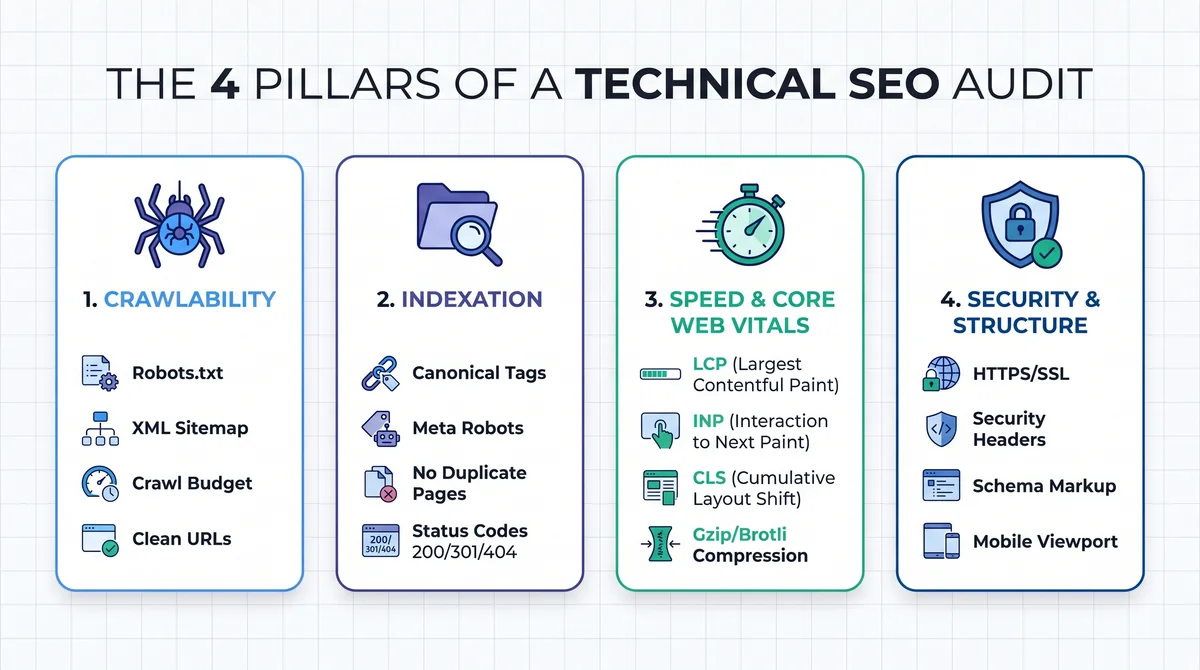
When these four pillars—Crawlability, Indexation, Speed & Core Web Vitals, and Security & Structure—work in harmony, every new article or landing page you publish gets indexed faster and competes at its full potential.
Why Technical SEO Is the Foundation of Search Rankings#
To understand why a minor technical misconfiguration can wipe out organic traffic overnight, look at the four sequential stages every webpage must pass through before it can rank in Google, as covered in our foundational guide on how search engines work:
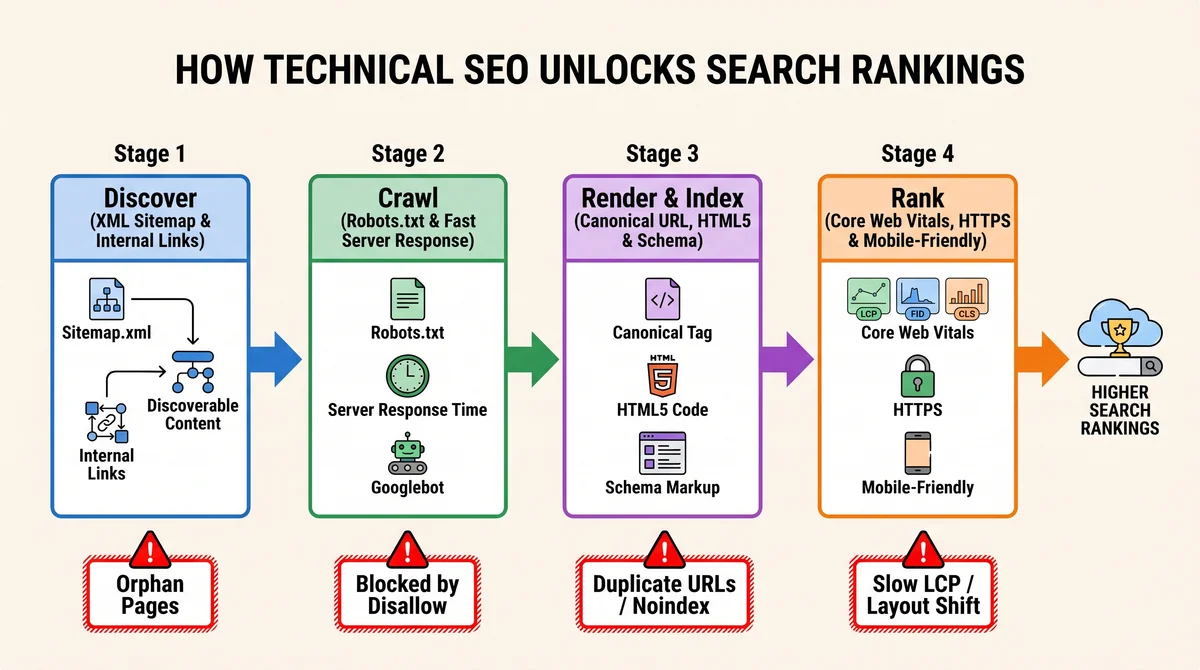
- Stage 1 — Discover: Search engines discover your URLs through XML sitemaps, internal links from existing pages, and external backlinks. If a page is orphaned with zero internal links and omitted from your sitemap, discovery stalls.
- Stage 2 — Crawl: Googlebot requests the URL from your server. If `robots.txt` blocks the path, the server returns a `5xx` timeout, or a 6-hop redirect chain traps the crawler, the page never gets read.
- Stage 3 — Render & Index: Search engines execute critical HTML/CSS/JavaScript, evaluate meta robots tags and canonical link elements, and store the canonical page in the search index. If an accidental `noindex` tag or wrong canonical tag is present, the page is dropped from the index completely.
- Stage 4 — Rank: Only after a page survives Stages 1 through 3 do Google's ranking systems weigh content quality, search intent, topical authority, backlinks, and Page Experience (Core Web Vitals / HTTPS) to determine where it ranks.
In short: content and backlinks determine how high you can climb, but technical SEO determines whether you are allowed on the mountain at all.
The 15-Point Technical SEO Audit Checklist#
Below is our complete, battle-tested 15-point technical SEO audit checklist, organized across the four core pillars of technical health.
Pillar 1: Crawlability & Site Architecture (Checks 1–4)
1. Audit Your robots.txt File for Accidental Blocks and Crawl Directives
Your robots.txt file lives at the root of your domain (https://yourdomain.com/robots.txt) and gives search engine crawlers their very first set of instructions. A single stray slash (Disallow: /) copied over from a staging environment can block Googlebot from crawling your entire website.
What to verify during your audit:
- Confirm that core public pages, CSS stylesheets, and JavaScript bundles required to render your layout are not blocked by
Disallowrules. - Ensure private admin routes (such as
/admin/,/api/, or internal account dashboards) are cleanly disallowed so crawlers focus on public content. - Verify that the bottom of your
robots.txtfile declares the full absolute URL to your XML sitemap (Sitemap: https://yourdomain.com/sitemap.xml).
"Diagnostic Tool: Test your live rules with our Robots.txt Tester or build a clean configuration from scratch using the Robots.txt Generator.
2. Validate Your XML Sitemap Accuracy and Hygiene
An XML sitemap acts as a direct roadmap of every canonical URL you want search engines to index. However, a dirty sitemap filled with broken URLs, redirected slugs, or noindex pages undermines search engines' trust in your sitemap signals.
What to verify during your audit:
- The sitemap returns an HTTP
200 OKstatus and valid XML syntax. - 100% of URLs listed in the sitemap return HTTP
200 OK, are indexable, and match their self-referencing canonical URL. - There are zero
404URLs, zero301/302redirecting URLs, and zeronoindexpages inside the sitemap. - Accurate
<lastmod>timestamps reflect genuine content updates.
"Diagnostic Tool: Check your live sitemap for errors with the Sitemap Validator or generate a standards-compliant sitemap using the XML Sitemap Generator.
3. Check HTTP Status Codes and Fix Broken Links (4xx & 5xx)
Every URL request returns a three-digit HTTP status code. Monitoring status codes across your internal links and indexed pages prevents dead ends for both users and crawlers.
| HTTP Status Range | Meaning | Common SEO Cause | Required Audit Fix |
|---|---|---|---|
| 200 OK | Success | Healthy live webpage | Ensure canonical and indexable |
| 301 Moved Permanently | Permanent redirect | Retired or consolidated URL | Update internal links to point directly to the final 200 destination |
| 302 / 307 Temporary | Temporary redirect | Often used accidentally instead of 301 | Switch permanent URL migrations to 301 so link equity transfers cleanly |
| 404 Not Found / 410 Gone | Page missing or deleted | Deleted slug or mistyped internal link | Fix broken internal links; 301 redirect deleted pages that have external backlinks or direct replacement content |
| 500 / 502 / 503 Server Error | Server failure or timeout | App crash, origin overload, or proxy timeout | Critical priority: causes rapid de-indexing if persistent; inspect server logs immediately |
"Diagnostic Tool: Inspect response codes and headers on any URL using the HTTP Status Checker.
4. Eliminate Redirect Chains and Redirect Loops
A redirect chain occurs when URL A redirects to URL B, which redirects to URL C (for example, http://example.com/post → https://example.com/post → https://www.example.com/post/ → https://www.example.com/new-post/).
Every extra hop in a redirect chain:
- Adds 100ms to 300ms of network latency before the browser can even begin downloading the HTML document.
- Wastes crawl budget and risks Googlebot abandoning the chain after multiple hops.
- Dilutes internal link signals.
Audit Rule: Flatten every redirect chain so URL A points directly to the final destination URL in a single `301` hop, and update internal anchor links inside your navigation and blog content so they link straight to the final 200 OK URL. Verify any suspect URLs with the Redirect Chain Analyzer.
Pillar 2: Indexation & Duplicate Content Control (Checks 5–8)
5. Audit noindex Directives in Meta Robots and X-Robots-Tag Headers
While `robots.txt` controls *crawling*, the meta robots tag (`<meta name="robots" content="index, follow">`) and the HTTP response header `X-Robots-Tag` control whether a crawled page is allowed into the search index.
What to verify during your audit:
- Confirm every public landing page, tool, and blog article renders
index, follow(or omits restrictive directives). - Check that utility search result pages, internal staging pages, or thin tag archives that should stay out of Google carry an explicit `noindex` directive—and are NOT blocked in `robots.txt` (because Googlebot must be able to crawl a page in order to read its
noindextag!).
"Diagnostic Tool: Scan any page's HTML meta directives and HTTP headers with the Meta Robots Checker.
6. Verify Canonical Tags (rel="canonical") Across All Pages
Duplicate or near-duplicate URLs frequently arise from tracking parameters (?utm_source=...), trailing vs. non-trailing slashes, uppercase vs. lowercase paths, or sort/filter query strings. The canonical tag tells search engines which single URL is the authoritative master version to index and credit with ranking signals.
What to verify during your audit:
- Every indexable page includes a self-referencing canonical tag inside
<head>using the full absolute HTTPS URL (for example,<link rel="canonical" href="https://flexaseo.com/blog/technical-seo-audit" />). - The canonical tag inside the HTML matches the URL declared in your XML sitemap and internal links.
- Canonical tags never point to a
404page, a301redirecting URL, or a page markednoindex.
"Diagnostic Tool: Inspect canonical tag declarations and catch conflicts instantly with the Canonical URL Checker.
7. Reconcile Google Search Console Index Coverage Reasons
Open Google Search Console → Indexing → Pages to inspect the gap between pages that are Indexed and pages that are Not Indexed. Pay special attention to four common status buckets:
- Crawled – currently not indexed: Googlebot fetched the page but decided its content was too thin, redundant, or lacking internal authority to warrant storing in the index. Fix by expanding content depth, checking your keyword map for cannibalization, and adding contextual internal links from high-authority pages.
- Discovered – currently not indexed: Google knows the URL exists (usually via your sitemap) but hasn't crawled it yet due to low priority or crawl budget constraints. Fix by linking to the page from prominent hub pages.
- Alternate page with proper canonical tag: Expected and healthy when parameter or alternate URLs properly canonicalize to a master URL—verify no important standalone pages landed here by mistake.
- Duplicate without user-selected canonical: Google found duplicate pages with no explicit canonical guidance and picked one on its own. Fix by adding explicit
rel="canonical"tags or301redirects.
8. Fix Orphan Pages and Flatten Click Depth
An orphan page is a live URL that has zero internal links pointing to it from any other page on your website. Even if an orphan page is listed in your XML sitemap, search engines treat internal link graph position as a major signal of page importance.
What to verify during your audit:
- Every important page should be reachable within 3 clicks from the homepage.
- Every blog article should belong to a category hub and connect bidirectionally with its parent pillar page and sibling cluster articles.
- Use clear, descriptive anchor text rather than generic phrases like "click here" or "read more."
Pillar 3: Speed, Core Web Vitals & Mobile Experience (Checks 9–11)
9. Measure and Optimize Core Web Vitals (LCP, INP, CLS)
Google's Core Web Vitals measure real-world user experience across loading speed, interactivity responsiveness, and visual layout stability:
| Core Web Vital Metric | What It Measures | Good Threshold | Needs Improvement | Poor Threshold | Top Technical Fixes |
|---|---|---|---|---|---|
| LCP (Largest Contentful Paint) | Time until the largest visible hero image or headline renders | ≤ 2.5 seconds | 2.5s – 4.0s | > 4.0 seconds | Reduce server TTFB, serve modern WebP/AVIF images, preload hero image, remove render-blocking CSS/JS |
| INP (Interaction to Next Paint) | Responsiveness when a user clicks, taps, or types on the page | ≤ 200 ms | 200ms – 500ms | > 500 ms | Break up long main-thread JavaScript tasks, defer non-essential third-party scripts |
| CLS (Cumulative Layout Shift) | Unexpected visual jumping of page elements while loading | ≤ 0.10 | 0.10 – 0.25 | > 0.25 | Always declare explicit width and height attributes on images, embeds, and ad containers; preload web fonts |
"Diagnostic Tool: Benchmark your loading speed and Core Web Vitals metrics with our Page Speed Test.
10. Verify Text Compression (GZIP / Brotli) and Asset Optimization
Uncompressed HTML, CSS, JavaScript, and SVG files waste bandwidth and slow down both mobile visitors and search engine crawlers. Similarly, serving unoptimized 3MB PNGs or JPEGs destroys Largest Contentful Paint scores.
What to verify during your audit:
- Confirm your web server or CDN enables Brotli (`br`) or GZIP (`gzip`) compression on all text-based assets using the GZIP Compression Test.
- Serve all blog illustrations and UI graphics in responsive next-gen formats (WebP or AVIF) with appropriately sized variants (
large,medium,thumbnail). - Configure
Cache-Controlheaders for static assets so repeat visitors load stylesheets, scripts, and images from browser cache instantaneously.
11. Audit Mobile-First Responsiveness and Viewport Configuration
Google uses mobile-first indexing across the web, meaning it crawls and evaluates the smartphone view of your website to determine rankings for both mobile and desktop searchers.
What to verify during your audit:
- Every page declares a responsive viewport meta tag:
<meta name="viewport" content="width=device-width, initial-scale=1">. - Content parity exists between desktop and mobile—never hide primary educational content, internal links, or structured data on mobile viewports.
- Tap targets (buttons, links) have adequate spacing and font sizes are legible without horizontal scrolling.
"Diagnostic Tool: Verify mobile rendering and viewport compliance using the Mobile-Friendly Test.
Pillar 4: Security, Structured Data & Semantic HTML (Checks 12–15)
12. Enforce HTTPS, Valid SSL/TLS Certificates, and Zero Mixed Content
HTTPS encryption is a confirmed Google ranking signal and a baseline trust requirement for modern browsers.
What to verify during your audit:
- Your SSL/TLS certificate is valid, issued by a trusted Certificate Authority, covers both root and
wwwsubdomains, and is not nearing expiration. - All
http://variants (bothhttp://yourdomain.comandhttp://www.yourdomain.com) permanently301redirect to your canonicalhttps://origin. - Zero mixed content warnings: Ensure no old hardcoded
http://image URLs, scripts, or stylesheets load inside anhttps://page.
"Diagnostic Tool: Inspect certificate validity, chain trust, and protocol support with the SSL Certificate Check.
13. Audit HTTP Security Headers (HSTS, CSP, X-Frame-Options, X-Content-Type-Options)
Strong HTTP security headers protect your visitors from protocol downgrade attacks, clickjacking, and MIME-sniffing vulnerabilities, while signaling enterprise-grade technical hygiene.
Key headers to check during your audit:
- `Strict-Transport-Security` (HSTS): Instructs browsers to connect exclusively via HTTPS.
- `X-Content-Type-Options: nosniff`: Prevents browsers from MIME-sniffing responses away from the declared content type.
- `X-Frame-Options` / CSP `frame-ancestors`: Protects your pages from unauthorized iframe clickjacking.
- `Referrer-Policy`: Controls how much referrer data passes on outbound clicks.
"Diagnostic Tool: Grade your live response headers with the Security Headers Checker.
14. Validate Semantic HTML Heading Hierarchy (H1 → H2 → H3)
Clean semantic HTML helps search engines parse the topical outline of your content and improves accessibility for screen readers.
What to verify during your audit:
- Every page has exactly one `<h1>` heading that aligns closely with its
<title>tag and primary keyword. - Major sections use
<h2>headings, and nested sub-points use<h3>headings without skipping levels arbitrarily (such as jumping from<h1>straight to<h4>). - Layout elements like sidebar labels, navigation menus, or footer disclaimers do not abuse
<h1>or<h2>tags.
"Diagnostic Tool: Inspect your heading tree on any URL with the Heading Structure Checker.
15. Implement and Validate JSON-LD Structured Data (Schema Markup)
Structured data written in JSON-LD format gives search engines explicit, machine-readable facts about your page—identifying whether a URL is an Article, a FAQPage, a SoftwareApplication, a Product, an Organization, or a BreadcrumbList.
What to verify during your audit:
- Core page templates include valid JSON-LD schema inside
<script type="application/ld+json">. - Every property proclaimed in your JSON-LD schema matches visible content on the page (never add fake ratings or hidden FAQ schema).
- JSON syntax parses cleanly with zero missing commas, unescaped quotes, or invalid property types.
"Diagnostic Tool: Create clean, copy-ready JSON-LD blocks using our Schema Markup Generator.
Step-by-Step Technical SEO Audit Workflow#
Trying to fix 15 different technical categories simultaneously without a sequence can feel overwhelming. Follow this six-step workflow to execute your audit methodically:
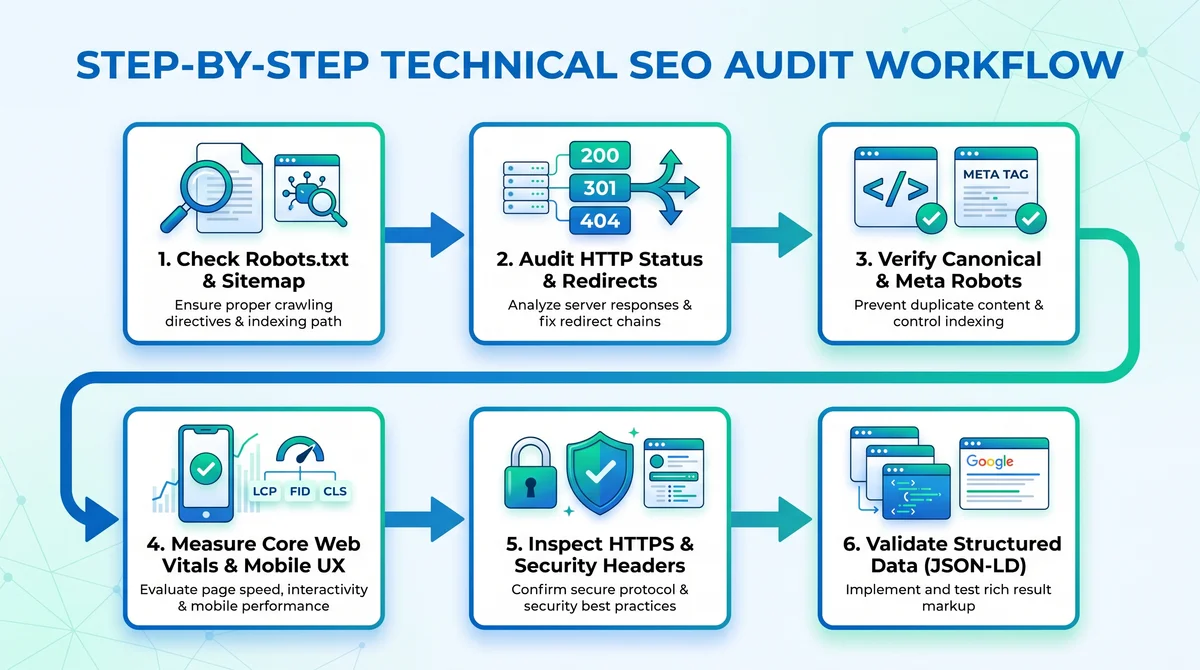
How to Prioritize Your Technical SEO Fixes
Once you complete your 15-point scan, sort every discovered issue into three priority tiers based on indexation impact and implementation effort:
| Priority Tier | Type of Technical Issue | Examples | Target Resolution Window |
|---|---|---|---|
| P0 — Critical Blockers | Issues that actively prevent crawling, indexing, or user access | Accidental Disallow: / in robots.txt, stray noindex on core pages, 5xx server errors, expired SSL certificate, broken canonical pointing to 404 | Immediate (Same Day) |
| P1 — High-Impact Bottlenecks | Issues that waste crawl budget, split authority, or degrade Core Web Vitals | Multi-hop redirect chains, broken internal 404 links, dirty XML sitemap containing 301/404 URLs, uncompressed 4MB hero images hurting LCP, orphan pages | Within 1–7 Days |
| P2 — Structural Enhancements | Optimizations that strengthen rich snippets, security posture, and CTR | Adding Article and BreadcrumbList JSON-LD schema, tightening H2/H3 hierarchy, fine-tuning security headers, refining title tags and meta descriptions | Within 2–4 Weeks |
Frequently Asked Questions#
How often should I perform a technical SEO audit?
Run a full 15-point technical SEO audit once per quarter for most websites, and conduct an immediate targeted technical check every time you deploy a site redesign, migrate URLs, change hosting providers, or update CMS routing rules. Additionally, monitor Google Search Console weekly for sudden spikes in 404 or 5xx errors.
What is the difference between a technical SEO audit and an on-page SEO audit?
A technical SEO audit inspects site-wide infrastructure—crawlability (`robots.txt`, sitemaps), indexation directives (`noindex`, canonicals), server responses (`301`, `404`, `500`), Core Web Vitals speed, HTTPS security, and structured data. An [on-page SEO](/blog/on-page-seo-guide) audit evaluates individual page content—keyword targeting, search intent alignment, title tags and meta descriptions, heading depth, readability, and internal anchor text.
Can technical SEO alone make my website rank #1?
No. Technical SEO is a foundational multiplier, not a substitute for helpful content. Fixing technical issues allows search engines to crawl, index, and trust your pages at 100% efficiency, which unlocks the ranking potential of your keyword research, content depth, and backlinks.
Why does Google Search Console say "Crawled – currently not indexed"?
This status means Googlebot successfully accessed the page (so there is no robots.txt or 5xx technical block), but Google's indexing systems decided the page did not add enough unique value to store in the search index. The most common causes are thin or placeholder copy, keyword cannibalization with another similar page on your site, or weak internal linking.
Do I need paid enterprise software to run a technical SEO audit?
While large e-commerce sites with 100,000+ URLs benefit from desktop crawlers, small-to-midsize websites, blogs, and SaaS platforms can execute a thorough technical audit for free by combining Google Search Console with specialized diagnostic tools like our Free SEO Analyzer, Robots.txt Tester, Sitemap Validator, Canonical URL Checker, Redirect Chain Analyzer, and Page Speed Test.
How long does it take to see results after fixing technical SEO errors?
It depends on the severity of the issue you fixed. Removing an accidental `noindex` tag or `robots.txt` block and requesting indexing in Google Search Console can restore rankings within 24 to 72 hours. Consolidating redirect chains, fixing orphan pages, and improving Core Web Vitals typically show measurable crawl and ranking improvements over 2 to 6 weeks as Googlebot recrawls your site graph.
Conclusion#
Technical SEO does not have to be a mysterious black box. When you break it down into its four core pillars—Crawlability, Indexation, Speed & Core Web Vitals, and Security & Structure—you can systematically verify every signal that search engines rely on to discover, render, and rank your pages.
Start with the P0 blockers first: confirm your robots.txt and XML sitemap are clean, verify your HTTP status codes and canonical tags, eliminate redirect chains, and ensure your pages load quickly over HTTPS. Once your technical foundation is rock-solid, every guide and landing page you publish will index faster and climb higher.
Ready to run your technical audit right now? Scan any URL with our all-in-one Free SEO Analyzer, validate your crawl directives with the Robots.txt Tester and Sitemap Validator, and check your canonical and redirect setup with the Canonical URL Checker and Redirect Chain Analyzer.
Need deeper step-by-step guidance on core technical pillars? Explore our dedicated guides on Robots.txt and XML Sitemaps, Canonical Tags and Redirects, and Internal Linking for SEO.