Robots.txt and XML Sitemaps: How to Control Search Engine Crawling and Indexing
Master robots.txt directives and XML sitemaps to optimize crawl budget, prevent accidental blocks, speed up Google discovery, and avoid common indexing traps.

When search engine crawlers visit your website, they operate on finite time and server capacity known as crawl budget. Left completely unguided, automated bots can burn hundreds of requests fetching private admin paths, API JSON endpoints, tracking parameters, or faceted filter combinations—while taking longer to discover your newest guides or pick up critical page updates.
Two deceptively simple plain-text files sit at the controls of search crawler guidance: `robots.txt` and your XML sitemap.
Yet despite sitting at the core of every [technical SEO audit](/blog/technical-seo-audit), robots.txt and sitemap.xml remain two of the most frequently misconfigured files on modern websites. A single misplaced character in robots.txt can wipe out organic traffic by blocking Googlebot from rendering essential pages—or trap noindex URLs in search results forever—while an outdated XML sitemap filled with redirects and 404 links undermines crawler confidence in your entire domain.
In this comprehensive guide, you will learn the exact operational difference between crawling, discovery, and indexing, master robots.txt syntax with copy-ready templates for modern web apps and blogs, learn how to construct an immaculate XML sitemap, and avoid the costly indexing traps that catch even experienced engineering teams.
Crawling vs. Discovery vs. Indexing: What Each File Controls#
Before modifying a single line of technical configuration, every SEO strategist and developer must cleanly separate three distinct mechanisms that search engines run sequentially (as explored in our foundational guide on how search engines work).
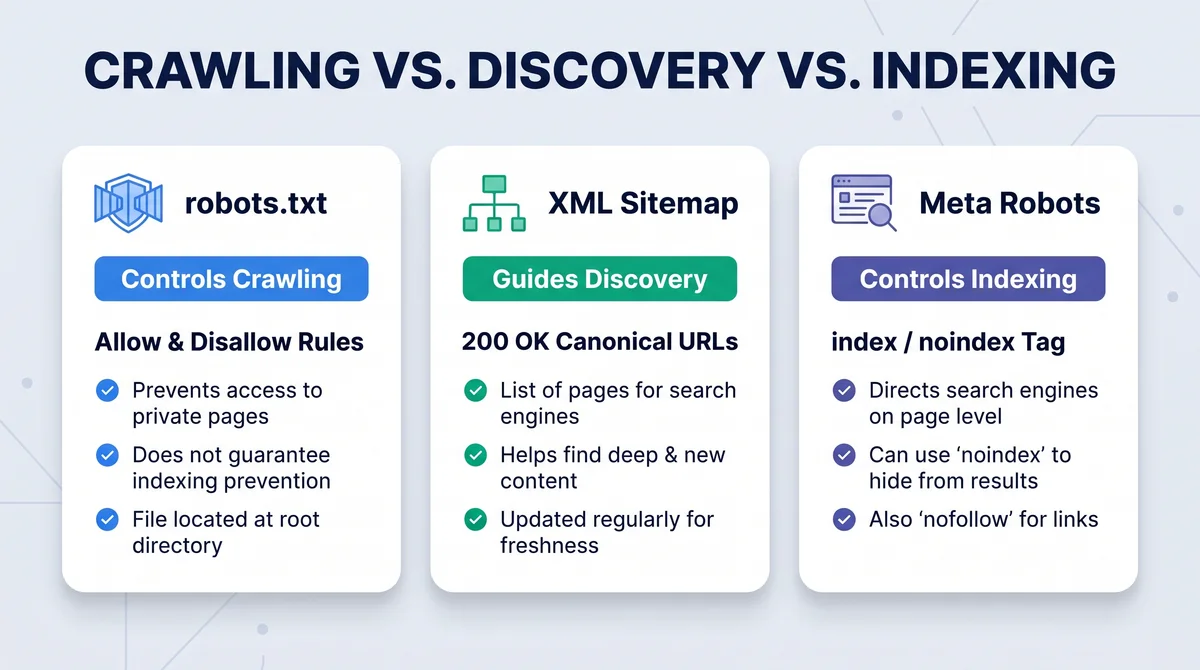
Confusing crawling rules with indexing controls is the #1 root cause of accidental de-indexing incidents across production websites. Here is exactly how the three layers divide responsibilities:
| Control Mechanism | Where It Lives | Core Responsibility | Stops a Page From Showing in Google? | Primary Real-World Job |
|---|---|---|---|---|
| `robots.txt` | Domain root: https://domain.com/robots.txt | Controls crawling (grants or blocks crawler permission to fetch matching URL paths) | No! External links pointing to a blocked URL can still let Google index the bare URL | Protect crawl budget by keeping bots out of /admin/, /api/, cart routes, and endless query loops |
| XML Sitemap | Root or declared location: https://domain.com/sitemap.xml | Guides discovery (delivers an authoritative roster of canonical URLs and <lastmod> timestamps) | No (listing is a discovery hint, never a guarantee of index inclusion) | Accelerate discovery of new pages, deep cluster articles, and recently updated guides |
| Meta Robots / `X-Robots-Tag` | Inside HTML <head> (<meta name="robots">) or HTTP response header | Controls indexing (index vs noindex, follow vs nofollow) | Yes — provided Googlebot is allowed to crawl the page to see it! | Cleanly exclude login pages, internal search views, thank-you pages, and thin archives from SERPs |
Understanding Crawl Budget (And When It Matters Most)
Crawl budget is the balance between crawl rate limit (how many requests per second your server can handle without slowing down) and crawl demand (how frequently search engines want to recrawl your URLs based on popularity and update cadence).
- For small websites with under 1,000 pages, crawl budget rarely creates bottlenecks unless you generate thousands of accidental dynamic parameter URLs (
?sort=,?filter=,?sessionid=). - For large SaaS apps, marketplaces, news publishers, and e-commerce catalogs with 10,000+ URLs, clean
robots.txtrules and accurate<lastmod>XML sitemaps directly govern how fast fresh content enters Google's index.
The #1 Technical SEO Trap: Never Combine robots.txt Disallow With noindex
Memorize this non-negotiable technical rule:
"If you block a URL in `robots.txt`, Googlebot cannot download the page—which means it can NEVER read the `<meta name="robots" content="noindex">` tag inside its HTML or `X-Robots-Tag` header!
When another website—or an uncleaned internal link—points to a URL blocked via `robots.txt`, Google may still create an index listing displaying the bare URL alongside the infamous warning snippet: "No information is available for this page."
How to handle it cleanly: If you want a page removed completely from Google Search results, ensure it is NOT blocked in `robots.txt`, serve noindex, follow (verifiable in seconds via our [Meta Robots Checker](/tools/meta-robots-checker)), and let Googlebot recrawl and drop it cleanly. Reserve robots.txt Disallow: strictly for private utility infrastructure where crawl waste is the primary concern.
What Is robots.txt and How Does It Work?#
The Robots Exclusion Protocol (robots.txt) is a plain UTF-8 text file located at the exact root of a protocol and hostname (https://flexaseo.com/robots.txt). Note that each protocol (http:// vs https://) and subdomain (www.domain.com vs app.domain.com) evaluates its own separate robots.txt file—subfolders like /blog/robots.txt are completely ignored.
Whenever a compliant crawler such as `Googlebot`, `Bingbot`, or AI indexing agents visits your domain, it requests `/robots.txt` first to parse the matching User-agent rules before making page requests.
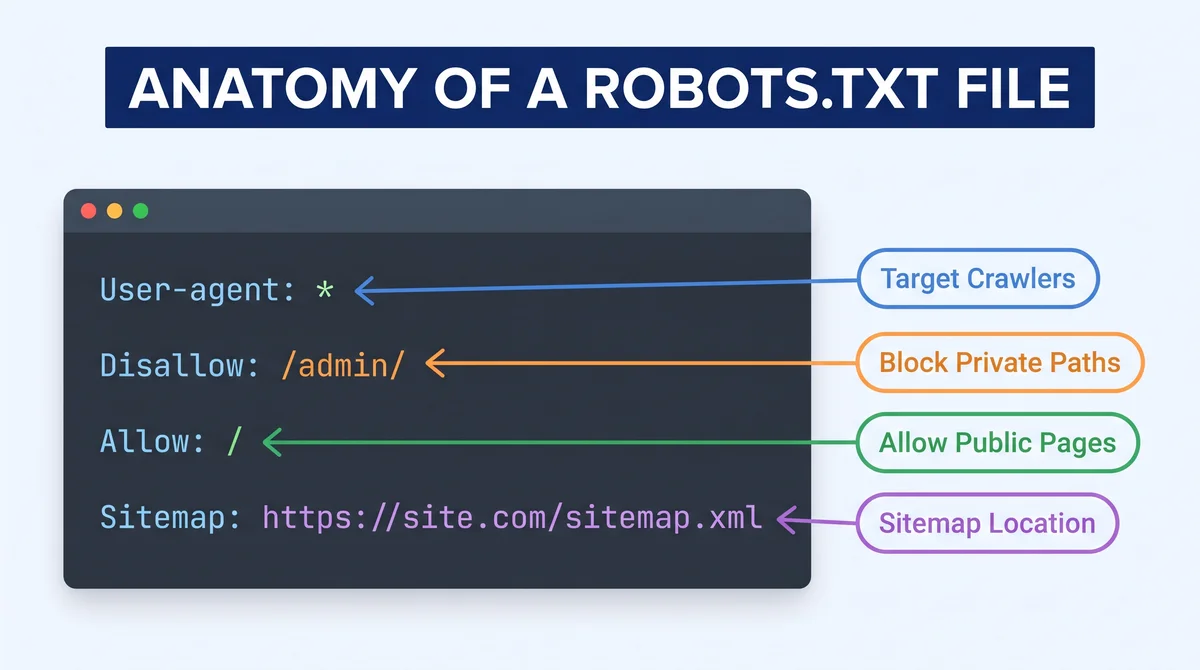
Complete robots.txt Syntax and Pattern-Matching Reference
| Directive | Purpose | Example Rule | Critical Behavior Notes |
|---|---|---|---|
| `User-agent:` | Declares which bot rule block applies to | `User-agent: ` (all bots)* or User-agent: Googlebot | If a dedicated `User-agent: Googlebot` section exists, Googlebot follows only that section and ignores the wildcard * block unless directives are repeated! |
| `Disallow:` | Path prefixes crawlers must NOT request | Disallow: /admin/ | An empty `Disallow:` allows all URLs; `Disallow: /` blocks 100% of the website |
| `Allow:` | Explicitly carves out permitted subpaths inside blocked directories | Allow: /api/og/ inside a Disallow: /api/ block | Supported by Google and Bing; when `Allow` and `Disallow` match, the most specific (longest character path) rule wins |
| `*` Wildcard | Matches zero or more characters in a URL path | Disallow: /*?sort= | Useful for blocking noisy query parameters anywhere in the URL |
| `$` Anchor | Anchors matching strictly to the end of the URL | Disallow: /*.json$ | Blocks URLs ending in .json while leaving /json-formatter safely crawlable |
| `Sitemap:` | Declares the absolute URL(s) of your XML sitemap | Sitemap: https://flexaseo.com/sitemap.xml | Include full https:// protocol; can appear multiple times anywhere in robots.txt |
*(Important nuance: Always remember paths in `robots.txt` are case-sensitive! Disallow: /Admin/ will NOT block /admin/.)*
(Also note: Google officially ignores the non-standard `Crawl-delay:` directive. Never rely on `Crawl-delay: 10` to fix slow servers; adjust crawl settings in Search Console or optimize server caching instead.)
Managing Search Bots vs. AI Crawler User-Agents Safely
Because modern publishers often evaluate how AI crawlers (`GPTBot`, `ClaudeBot`, `PerplexityBot`) interact with their content, many teams add user-agent blocks inside `robots.txt`. Critical safeguard: If you create a dedicated `User-agent: GPTBot` group, keep it completely separate from your `User-agent: *` and `Googlebot` rules, and never block `Googlebot` or `Bingbot` unless you want to disappear from organic search completely. If you accidentally leave Disallow: / inside an untagged block without a proper User-agent: header right above it, syntax parsers can misread the file!
4 Production-Ready robots.txt Templates
1. Modern SaaS / Next.js Web Application
Why `Allow: /_next/static/` matters: Search engines render modern websites inside headless Chromium to evaluate mobile usability, visual stability, and rendered content. Blocking CSS or JavaScript bundles blinds Googlebot, breaking visual rendering and damaging rankings.
2. Content Publishing & WordPress Blog
3. E-Commerce Store With Faceted Filtering Bloat
4. Blocking Specific Non-Search Scrapers While Keeping Search Intact
Validating robots.txt Before Shipping Any Change
Because one misplaced slash can vanish an entire domain's search presence within 48 hours, always test live paths against your rules using our Robots.txt Tester—or generate clean, standards-compliant rules effortlessly with our Robots.txt Generator.
What Is an XML Sitemap and How Does It Speed Up Indexing?#
While `robots.txt` acts as a security perimeter keeping crawlers *away* from low-value utility paths, an XML sitemap serves as an architectural table of contents handing search engines a structured, up-to-date catalog of every canonical URL you want discovered, crawled, and refreshed.
An XML sitemap is especially vital when:
- Your site is brand new and has few external backlinks pointing in yet.
- Your website publishes hundreds or thousands of pages where deeper guides sit 3+ clicks away from the homepage.
- You regularly refresh existing content or publish time-sensitive updates.
Standard XML Sitemap Code Anatomy
XML Sitemap Tags: What Search Engines Use vs. Ignore
| XML Tag | Required? | Search Engine Behavior & Best Practice |
|---|---|---|
| `<loc>` | Yes | Must contain the exact, absolute canonical HTTPS URL (no relative paths like /blog/post, and special characters like & must be XML-escaped as &) |
| `<lastmod>` | Strongly Recommended | ISO 8601 date (`YYYY-MM-DD` or full UTC timestamp) reflecting the real last meaningful content update. Google explicitly relies on trustworthy `<lastmod>` values to schedule recrawls—never fake all dates to today on every build! |
| `<changefreq>` | Optional (Ignored) | Google publicly confirms it ignores <changefreq> (daily, weekly, monthly). Omit it to reduce XML file weight |
| `<priority>` | Optional (Ignored) | Google ignores <priority> (0.0–1.0) because site owners routinely assign 1.0 to every URL. Omit it cleanly |
File Limits and Modular Sitemap Index Files
According to the official Sitemaps protocol, a single `.xml` sitemap cannot exceed 50,000 URLs or 50 MB (uncompressed). Growing sites organize large catalogs cleanly using a parent Sitemap Index (/sitemap_index.xml):
Splitting by content template also delivers a bonus diagnostic superpower inside Google Search Console: you can inspect indexed vs. excluded ratios separately for blog guides, category pages, and tool pages!
Automating Dynamic Sitemaps in Modern Web Apps
Manually updating static .xml files after every published article inevitably leads to forgotten slugs or stale <lastmod> dates. In modern frameworks like Next.js (app/sitemap.ts) or managed CMS platforms, generate your sitemap dynamically directly from your live database or post store:
- Filter out drafts, scheduled posts,
noindexentries, and archived URLs at generation time so onlystatus === 'published'URLs appear. - Pull
<lastmod>directly from each article's realupdatedAtorpublishedAttimestamp rather than callingnew Date(). - Normalize every URL with your single canonical
https://origin so development domains (localhost) orwww.variants never leak into production builds.
XML Sitemap Hygiene: What to Include vs. Exclude#
Think of your XML sitemap as a VIP guest list, not a raw dump of every route in your database. Including broken, redirected, or non-canonical URLs inside sitemap.xml wastes crawl resources and signals poor site maintenance.
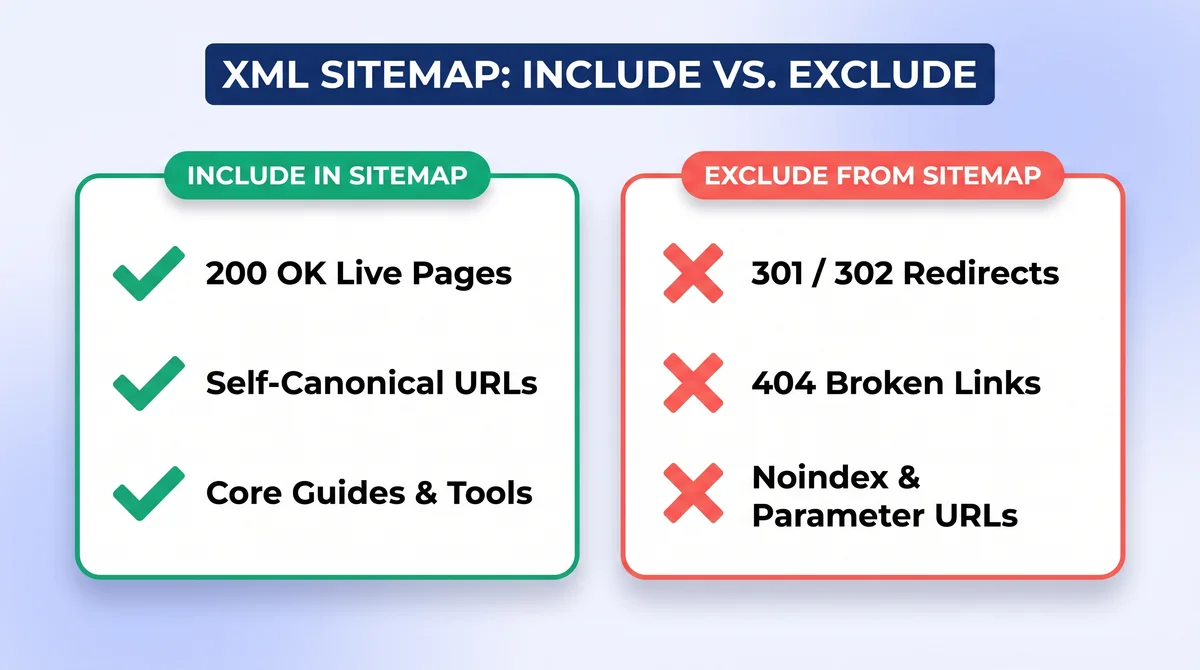
XML Sitemap Inclusion Decision Matrix
| Page Characteristic | Include in Sitemap? | Why & Next Step |
|---|---|---|
| Live `200 OK`, self-canonical, indexable guide or landing page | Yes | Core candidates for organic search visibility |
| Page returning `301` or `302` redirect | Exclude | Replace old URLs with the final canonical 200 OK destination; learn why in our canonical tags and redirects guide |
| Page returning `404 Not Found` or `410 Gone` | Exclude | Immediately prune deleted URLs from dynamic sitemap generation |
| Page carrying `noindex` (`meta` or `X-Robots-Tag`) | Exclude | Listing a noindex page inside a sitemap sends contradictory crawl instructions |
| Non-canonical parameter URL (`?utm_source=`, `?sort=`, `?page=1`) | Exclude | Only list the clean, canonical master URL |
| URL blocked in `robots.txt` | Exclude | Sitemaps should never ask Googlebot to index paths you explicitly forbade it from crawling |
Check your live URL status codes and validate every line of your sitemap directly with our HTTP Status Checker, build crisp compliant XML files via the XML Sitemap Generator, and catch syntax or broken-URL bugs immediately with the Sitemap Validator.
Submitting and Monitoring Crawl Signals in Google Search Console#
Once your robots.txt and sitemap.xml pass local validation, follow this deployment verification workflow:
- Confirm Raw Accessibility & HTTP Status Codes: Ensure both `https://yourdomain.com/robots.txt` (`Content-Type: text/plain`) and `https://yourdomain.com/sitemap.xml` (`Content-Type: application/xml`) return HTTP `200 OK` without redirecting through multiple hops or hitting CDN bot-protection challenges! Test with our Indexability Checker.
- Declare the Sitemap Inside `robots.txt`: Add
Sitemap: https://yourdomain.com/sitemap.xmlso Bing, DuckDuckGo, and other search crawlers discover it automatically without manual submissions. - Submit in Google Search Console: Navigate to Indexing → Sitemaps, paste your sitemap filename (`sitemap.xml`), and click Submit. Wait for the status to update to Success.
- Reconcile Sitemap Coverage Reports: Open Indexing → Pages, toggle the dropdown filter to All submitted pages (your sitemap URLs specifically), and inspect any URLs sitting in Excluded or Not indexed:
- Blocked by robots.txt: Verify whether an unintended wildcard rule blocked an important URL. - **Excluded by 'noindex' tag:** Remove unintended `noindex` pages from your XML sitemap (or strip accidental `noindex` tags from live guides). - **Submitted URL not found (`404`):** Clean dead slugs out of your database or sitemap builder. - **Crawled – currently not indexed:** Expand unique content depth and strengthen [internal linking for SEO](/blog/internal-linking-for-seo) from authoritative hubs.
7 Common robots.txt and XML Sitemap Mistakes#
- Shipping a Staging `Disallow: /` File to Production: One accidental deploy overwrite hides your entire domain from search crawlers. Automate a CI check or immediate post-deploy curl test to verify
/robots.txtnever containsDisallow: /globally in production. - Blocking CSS, JavaScript Bundles, or Fonts in `robots.txt`: Blocking
/static/,/assets/, or/_next/static/breaks Chromium page rendering and hurts Mobile-Friendly and Core Web Vitals assessments. - Blocking `noindex` Pages in `robots.txt`: Prevents Googlebot from downloading the page to read the
noindexdirective—leaving unwanted URLs trapped in search snippets indefinitely. - Serving `robots.txt` With HTTP `500` / `503` Server Errors: When `/robots.txt` returns persistent `5xx` server errors, Googlebot halts crawling your entire domain to avoid accidentally scraping disallowed areas. Keep
/robots.txtultra-fast, statically cached, and returning200 OK. - Forgetting Absolute URLs or Correct Hostnames in `sitemap.xml`: Mixing
http://withhttps://, or mixingwww.with root apex URLs inside<loc>, creates mixed canonical signals across your domain. - Setting `<lastmod>` to Current Runtime Timestamp on Every Request: Generating
new Date().toISOString()dynamically inside<lastmod>for untouched articles signals unreliability, causing bots to ignore<lastmod>altogether. - Relying on an XML Sitemap Instead of Internal Links: Listing an article only in
sitemap.xmlwithout linking to it inside your site hierarchy leaves it stranded as an orphan page with weak PageRank authority.
Frequently Asked Questions#
Is a robots.txt file strictly required for SEO?
Technically, if your website has no `robots.txt` file (and `/robots.txt` returns a clean `404`), search bots interpret that as permission to crawl your entire site. However, every production website benefits from a clean `robots.txt` to stop crawlers from wasting requests on /api/, /admin/, and parameter noise, and to declare your exact Sitemap: URL cleanly.
How often does Googlebot refresh its cached copy of robots.txt?
Google typically caches a domain's `robots.txt` file for up to 24 hours (or less when standard Cache-Control: max-age headers specify shorter durations). If you push an emergency fix removing an accidental Disallow: /, you can trigger a re-fetch inside Google Search Console's robots.txt settings report right away.
Can robots.txt hide confidential files or sensitive admin portals?
Never. Your robots.txt file is publicly visible to anyone in the world at https://yourdomain.com/robots.txt, and malicious scanners specifically inspect Disallow: paths looking for hidden admin panels or backups! Always secure private dashboards and APIs using real server authentication, RBAC permissions, and firewall rules.
If my new blog post is listed in sitemap.xml, why isn't it indexed yet?
Inclusion in an XML sitemap tells Google where to find a URL—not that it deserves to rank. If an article sits in "Discovered – currently not indexed" or "Crawled – currently not indexed", strengthen internal linking from authoritative existing pages, align the content clearly with search intent, verify there is no keyword cannibalization, and inspect technical tags with our Indexability Checker.
Can one robots.txt list multiple XML sitemaps?
Yes. You can place multiple Sitemap: lines at the end of your robots.txt file (one per line with full https:// URLs), or consolidate multiple sitemaps neatly behind a single parent sitemap_index.xml.
Should paginated blog URLs (?page=2), search pages, or filtered results go in my XML sitemap?
No. Keep internal search results, UTM-tagged campaign links, sort orders, and thin tag combinations out of your XML sitemap so 100% of listed URLs represent high-value, self-canonical 200 OK destinations.
Conclusion#
When your robots.txt directives and XML sitemap operate in sync, search engine bots spend zero crawl budget on dead ends and maximum energy discovering, rendering, and updating the pages that actually drive organic search revenue.
Keep your robots.txt concise and rendering-safe (blocking only non-public routes and noisy query parameters, never CSS/JS or noindex pages), serve a sparkling-clean 200 OK canonical XML sitemap with honest <lastmod> timestamps, and back up your crawl roadmap with strong internal linking and unambiguous canonical tags.
Take five minutes to verify your own setup right now: test your live crawl rules in the Robots.txt Tester, generate clean directives with the Robots.txt Generator, inspect or build your sitemap using the Sitemap Validator and XML Sitemap Generator, and check page-wide compliance inside our Free SEO Analyzer.